Does your business leave a good impression, yet struggle to turn first-time customers into regulars? If yes, you must be making one mistake: sending boring, plain, and robotic emails. Sending more of the same repeated message only increases frustration and churn. When you fire off emails that feel tailor-made for each person, you’re not just hitting “send”—you’re laying the groundwork for genuine relationships.
At the heart of every good customer experience is simple, honest communication. Sending the first confirmation, an appointment reminder, or a follow-up is part of the client experience. It’s one of the best ways to stay connected throughout every phase of the buyer’s journey as well.
That’s where Picktime’s Custom Email feature steps in— it helps you outline your emails to match your brand and message instantly. So, if you want to write effective emails, based on different related scenarios, you’ve come to the right place. Keep reading…..
How Do Emails Affect Customer Experience Directly?
Customer experience is the impression that is based on the overall perception and feeling of how your customer enjoys their entire buying journey. An email includes every touchpoint or engagement that creates a base for customers to have a better client experience.
Whether it’s a booking confirmation, cancellation, or a class reminder, your email is usually the very first thing a customer sees after scheduling an appointment. If you see it as just another task to tick off, that may not be the way your customer sees it. Believe it or not, those robotic emails can feel like they came from a machine, not a real person, and end up sounding dull and impersonal.
When you personalize the email according to your brand, friendly and personal. That’s when it starts feeling like a real experience; you’ll naturally build an everlasting customer experience.
Strategies to Improve Customer Experience with Personalized Emails
With an appointment scheduling software like Picktime, you’ve got the freedom to make your emails feel just right. You might be wondering, how can personalizing each email actually improve the customer experience? So we pulled together a few relatable scenarios you’ve probably come across every day. The best part? We’re not just showing them out—we’ve got easy fixes for you, too.
Whether it’s the tone, colors, or even the Email subject line, you can tweak all of these elements to match your brand’s vibe and scheduling requirements.
Since you don’t need to write an email from scratch, it’s easy to start with a default template. Or, you can add a few placeholders, make a couple of quick edits, and your prospects get custom emails that feel personal (not robotic). If you want to tweak a confirmation, reminder, or even a waitlist update, Picktime has got you covered.
1. Confirmation Email Practice
Now, here is one thing to remember: the confirmation is the very first interaction her customer is gonna have with Sarah’s brand. The customer hasn’t seen the salon or experienced any of her offerings. This simple and detailed email is their first peek, and it’s the beginning of how they’ll feel about the entire process.
To set a positive impression, instead of a repetitive email, “Your appointment is confirmed, she wanted to send a warm and genuine confirmation email. She knew that including touches could create a better customer experience before clients stepped into her salon.
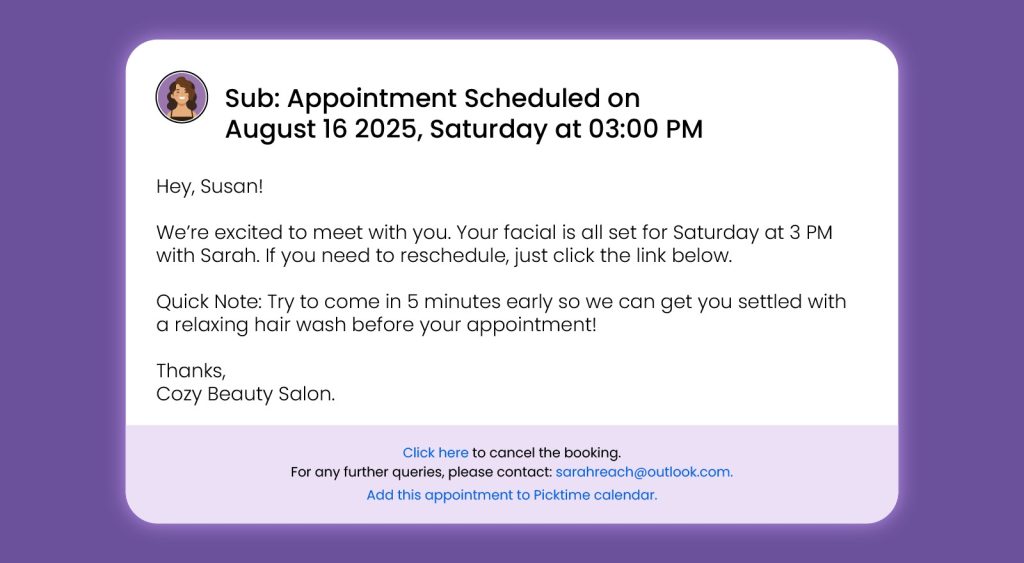
She opened the email settings of Picktime and made changes to the confirmation email by adding the tags of a {client_name}, {appointment_date}, and {service_name}. The email suddenly appears to be friendly and positive:
“Hey, Susan! We’re excited to meet with you. You have your face on Saturday at 3 PM with Sarah. If you’d like to adjust your appointment time, select a new slot using the link provided.
To make it more personal and informative, she adds a quick tip: “Try to come in 5 minutes early so we can get you settled with a relaxing hair wash before your appointment!” Later, she concludes the email with her salon address, a friendly sign-off to ensure there is no confusion.
With just a few edits, Sara turned a generic email into something that truly felt like her own.
2. Class Reminder with a Friendly Tone
An appointment reminder may feel like a small detail, but it is crucial in shaping customer experience. A thoughtful reminder ensures customers, builds professionalism, and helps to keep your customers committed to their booking. When done right, it automatically reduces the chances of last-minute no-shows.
Jessica knows this well. She offers scheduled classes and manages everything through Picktime. Once a student books a session, she makes sure they receive a friendly reminder before the class begins.
Jessica simply opens her Picktime dashboard, goes to the custom email settings, and chooses an appointment reminder template. These templates already include helpful placeholders like {client_name}, {service_name}, {booking_time}, and {meeting_link}, allowing her to personalize each reminder in seconds.
This is what one of her reminder emails looks like:
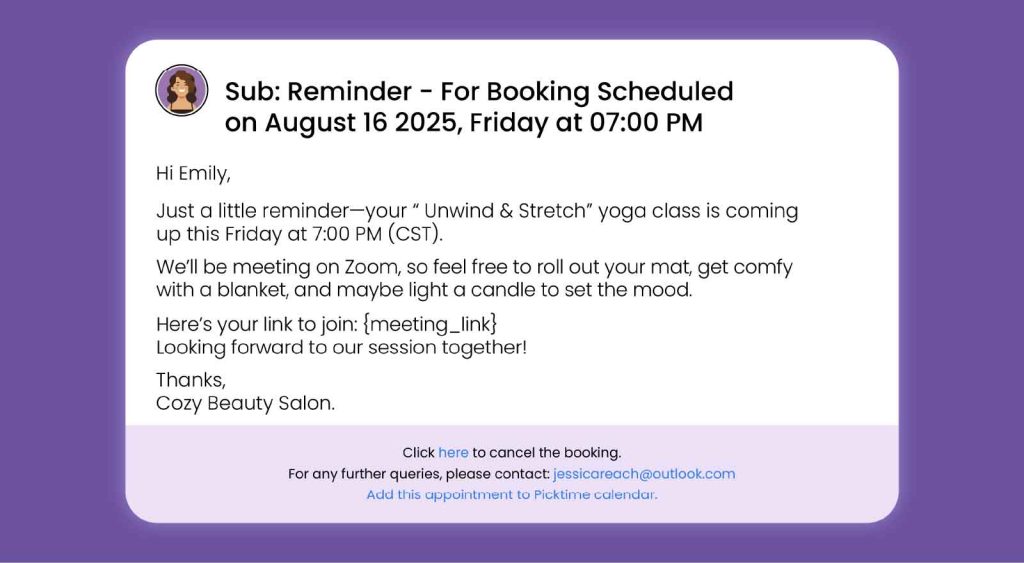
The email sounds warm, relaxed, and genuine, the way Jessica wants her brand to showcase. The result? More customers actually show up on time. They feel welcomed and ready before the class even begins.
3. Rescheduling Request
It’s common for customers to rebook their appointments due to changing priorities and constraints. Give your customers every possible option to reschedule their appointments. When you provide flexibility and understanding, these small experiences often shape how customers remember your brand.
Take Nick, for example. He runs a consulting business and manages her consulting sessions through Picktime. As he was busy with other admin work, he received a text from his client that he was busy due to personal commitments and could not attend the meeting. The client is therefore interested in rescheduling the appointment.
Using smart placeholders such as {client_name}, {service_name}, {appointment_date}, and {rescheduling_link}, Alex quickly personalizes the message. The email now addresses the client by name, clearly mentions the session they booked, and includes a direct link to choose a new time—all without writing the email from scratch.
4. Turn a “Cancellation” into “Maybe Later”
David owns a growing consultancy that helps entrepreneurs refine their brands and launch new ideas. While he was finishing his workload, a notification caught his attention, saying “A client cancelled their upcoming one-on-one virtual session.
Sending a basic cancellation email can impact your brand reputation. But David knew that every experience counts, especially when a client is cancelling an appointment. Cancelling an appointment never has to feel abrupt or impersonal.
He used ready-to-use placeholders, such as {client_name}, {service_name}, and {rescheduling_link}, to make the email more personalized and polished.
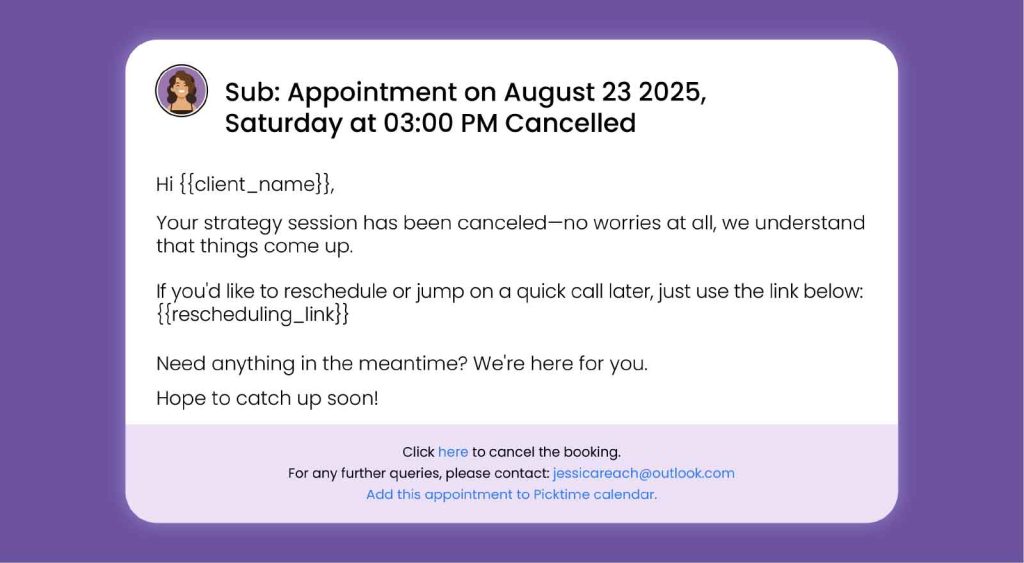
When you give your clients easier ways to rebook their appointments, thereby cancellation turns into an open invitation. It’s just a respectful and helpful nudge that says: “We’re here when you’re ready.”
💡 Remember: It’s not just about confirmations, reminders, or cancellations—you can also customize appointment pending, waitlist alerts, and much more using Picktime. This helps everyone stay on the same page and makes it easier for you to provide a personalized experience.
Let’s Wrap It Up!
This blog just touches the surface of what you can do with our customizable email. Picktime’s custom email feature helps you get everything you need to enhance customer experience, save time, and establish a stronger customer relationship. By using our personalized emails, you can ensure your emails are informative, captivating, and reflective of your brand identity. The email system aligns seamlessly with your scheduling system, so you can focus on other aspects of your business. An easy way to keep your workflow smooth, show off your brand’s professionalism, and build a better customer experience. Try Picktime’s custom email templates today!