Key Takeaways:
- Conference room management software helps businesses track room usage, availability, equipment needs, and booking behavior in one place.
- Room usage reports help teams understand which rooms are overused, underused, or mismatched with real meeting needs.
- An overview dashboard helps office teams manage daily room activity without switching between calendars or spreadsheets.
- An analytics dashboard helps leaders understand long-term room usage, peak demand, no-shows, and space planning trends.
- A meeting room scheduling system can reduce no-shows, booking conflicts, and manual follow-ups.
- Picktime helps growing businesses manage meeting rooms, visitor spaces, training rooms, and rental spaces with a more organized booking process.
Today, many offices deal with diverse meeting room requirements, including hybrid work, in-office work, or remote working. When people can be productive from anywhere in the world, many people need a place where they can build collaboration, network, and creativity. Clear meeting room utilization helps the team support flexible work and make better use of every space.
However, many offices still use fragmented processes and separate tools to keep track of their operations. If your reports and business insights are not easy to check, small scheduling errors can happen more often. On the other hand, IT and facilities teams need a better understanding of what is actually happening across rooms, floors, and locations.
Conference room management software offers advanced features to provide your facilities’ key metrics. By analyzing important reports and analytics, you can increase room usage and productivity for participants and office admins. This helps you enhance your participants’ overall experience, while leaders can see whether rooms are overbooked, underused, or missing the tools people need. This guide will explore the importance of efficient room use and how you can improve space planning and management.
Table of Contents
Why Office Space Utilization Is Important for Modern Workplaces
Room usage refers to utilization data that represents how an office uses its meeting rooms. It includes tracking important details, such as total room bookings, peak demand times, and overall room activity across different days, weeks, and months. For hybrid workplaces, it becomes more important, as teams may not use the meeting rooms or shared workspace the same way every day. For example, some rooms remain empty most of the week, while certain rooms are booked by teams throughout the week.
When you check office usage data more closely, organizations can identify the booking pattern in which conference rooms are underused, overcrowded, or not serving their purpose well. Moreover, effective utilization of meeting rooms can lead to cost savings. Business admins can identify rooms that are barely used and make better use of those spaces.
Best Ways to Increase Room Utilization and Improve Space Planning
Better meeting room management starts with valuable data. When organizations review reports and analytics, they can understand which rooms are in demand, which spaces need attention, and how to plan their workspace more effectively.
1. Finding Areas Of Inefficiency
Reports and analytics indicate the possibilities where your meeting rooms are occupied compared to others. These metrics make it easier for admins to evaluate the efficiency of the space utilization. For example, when you use separate tools, you may overlook that large meeting rooms are often booked for small discussions. With Picktime’s conference room management software, you can get clear data on room booking utilization, like how often these meeting rooms are being used. It gives you a clearer view and helps employees choose rooms more thoughtfully, and improves overall space usage.
2. Optimizing Meeting Room Usage
Understanding meeting room revenue allows you to make smarter decisions about pricing, promotions, and how each room should be used. Many offices struggle with meeting rooms that stay unused most of the time. With meeting room booking software, you know which rooms are underutilized and need more strategies to make the most out of these rooms. Optimizing meeting room usage results in less wasted space, controls real estate costs, and creates a more organized workplace.
3. Improving Employee Productivity
The 4Cs, collaboration, connection, creativity, and culture-building, work best when teams have comfortable spaces designed for meaningful discussions. When meeting rooms are planned with the right capacity, participants feel more focused, included, and confident to share their ideas. Meeting room analytics helps you find gaps and gives crucial data on which rooms are bringing more revenue. The reports generated by Picktime also give you data on which organizers are performing well, and employees spend less time searching for space or dealing with missing resources. This reduces frustration from manually collecting this data from different analytics tools and analyzing it, and helps teams stay focused.
4. Creating a Better Workplace Experience
Meeting room analytics also help you understand how employees collaborate in the office. With Picktime reports, you can take complete control of your resources, how often each room is booked, which resources are requested most, and which spaces have the no-show rates. These detailed insights help you provide an easy booking experience so employees can access the rooms they need without unnecessary delays or confusion.
5. Overview Dashboard
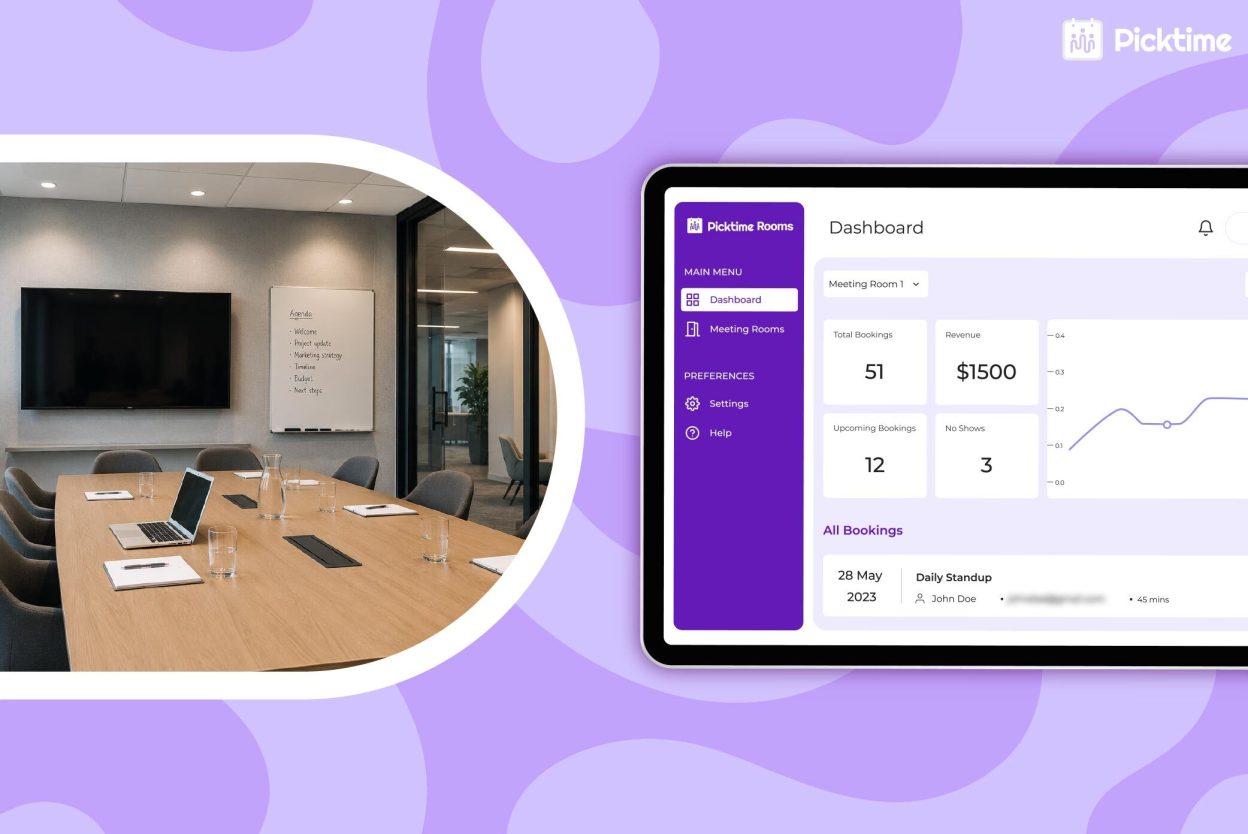
An analytics dashboard helps leaders understand room usage over time. Picktime’s conference room management software helps you understand how your rooms are performing day to day. You can see when rooms are booked the most, which spaces are in high demand, which rooms are not being used enough, and what resources are often needed. This makes it easier to plan your space, improve room availability, and support your teams with the right setup. These insights help you understand what is actually happening with your meeting rooms. For example, if a room stays booked during peak hours, you can adjust availability or create clearer booking rules. If some rooms are rarely booked, you can review their setup, location, or amenities to understand why.
How Picktime Supports Better Conference Room Management
Managing multiple team members, rooms, and organizers has become difficult if you use scattered processes. That’s why Picktime’s conference room management software helps organizations manage shared spaces without the back-and-forth. For office admins, the room booking software can easily rent out meeting rooms, set participant capacity, include equipment, and send automated reminders.
As offices grow, managing conference rooms, hybrid workspaces, and shared meeting areas can quickly become difficult without the right appointment booking system. Room booking software acts like a reliable support tool that helps teams keep daily office operations organized, simple, and easier to manage. It also provides a smarter view of what is happening across all your conference rooms. You can see total bookings, overall revenue, sales, and whether payment is made by cash or card. Moreover, you can create different reports for different resource types, which you can download and print directly from your Picktime dashboard.
Reports and analytics give you a better understanding of how each bookable conference room is performing. You can see which rooms attract the most bookings, which spaces are underused, and where demand is growing. If you are planning to expand your business, this data helps you decide where to focus your time, budget, and resources. It also integrates with 30+ third-party apps to automate your entire scheduling operations. As a result, it presents fewer scheduling mistakes, no manual updates required, and detailed data to further plan meeting room layouts.
Final Thoughts
Modern conference rooms facilitate hybrid team meetings, client presentations, interviews, training programs, project planning, and team collaboration. When employees struggle to find and book the right meeting room, it can disrupt workflows and reduce overall office efficiency. Picktime’s conference room management software gives IT, facilities, and office teams the live visibility they need to book and manage rooms with confidence. By tracking room usage, capacity, no-shows, and peak times, businesses can make better space planning decisions.
Efficient meeting room utilization is essential for improving workplace productivity, reducing resource waste, and supporting business growth. Picktime’s powerful room booking software with reporting and analytics features gives you the insights needed to optimize room usage and make confident, growth-focused decisions. Sign up for free and streamline your workspace management.
FAQ’s
1. How does conference room management software improve space planning?
Picktime’s conference room management software helps teams see which rooms are used most, which rooms sit empty, and whether room capacity matches actual meeting needs. These insights help businesses adjust layouts, add smaller rooms, improve equipment, or change booking rules.
2. What is the difference between an overview dashboard and an analytics dashboard?
An overview dashboard shows what is happening right now, such as today’s bookings, available rooms, pending approvals, and check-ins. Picktime’s analytics dashboard shows long-term room usage patterns, such as peak times, no-shows, capacity mismatches, and equipment demand.
3. Can an online conference room booking system support room rentals?
Yes. Picktime’s online conference room booking system can help businesses show available rooms, collect booking details, manage approvals, send confirmations, and organize paid or free room reservations.
4. Why should IT teams care about room usage reports?
IT teams often support screens, cameras, speakers, projectors, and video conferencing tools. Room usage reports help them understand which rooms need better equipment, which setups are used most often, and where meeting support is most needed.