Key Takeaways:
- A booking without payment is a weak commitment. Even a partial deposit changes that. Once clients have money tied to the appointment, they are more likely to show up.
- No-shows cause a huge loss for businesses. They leave empty gaps in your schedule, reduce daily revenue, and waste the time you set aside to serve that customer. Over time, even a few missed appointments each week can quietly turn into a serious financial drain.
- You do not need one payment model for every service. Partial deposits work well for routine bookings, while full prepayment makes more sense for high-demand slots, packages, and first-time clients.
- Your booking process shapes how clients see your brand. Picktime lets you maintain a smooth flow that lets them book through an online booking page and pay in one step, which feels professional.
It’s 2:45 PM on a Tuesday. You have prepped the treatment room an hour ago. You turned away a walk-in who could have filled that slot. Your practitioner is ready, the team has laid out the products, and the clock is ticking toward a 3 o’clock HydraFacial.
Then your phone buzzes. “Hey, something came up. Can we reschedule?”
You stare at the screen for a moment. Not because you’re surprised. Because this is the third time this month. Those empty slots in your practice not only create inconvenience but also form a hole in your daily revenue. And the hardest part? There was nothing technically wrong with your booking process. Your client confirmed. But they just didn’t show up.
Here’s what most med spa owners eventually realise: a booking without advance payment is barely a commitment at all. When a client books an appointment without paying an advance amount, cancelling costs them nothing. That’s where your revenue is leaking.
And the fix is straightforward. Requiring advance payments at the moment of online booking helps to keep your clients. This post walks you through exactly how it works, what the options are, and how med spa software like Picktime makes it simple to put into practice.
Table of Contents
The Real Cost of No-Shows for Med Spa Teams
Let’s imagine. At an average first-visit revenue of $536 (the industry average per med spa visit), that’s roughly $64,000 in first-visit revenue alone. Factor in the lifetime value of those lost patients, even conservatively, at $3,000 to $5,000 per patient, and the annual cost is staggering. You and your team are not only losing time on scheduling, taking payments, prepping the room, and more.
Another major problem businesses face is due to no-shows, which can lose their loyal clients as well. Without that small commitment, clients are far more likely to treat appointments casually or cancel at the last minute. That is where advance payments help. Even a partial deposit makes the appointment feel more real. The client is no longer just holding a spot. They have already invested in it, and that often makes them more likely to show up.
Why Advance Payments Are a Game-Changer for Med Spas
Most of the med spa owners think “advance payments” means asking every client to pay the full service total before they arrive for their appointments. Your payment models should depend on your services, your client base, and how you want to position your booking experience.
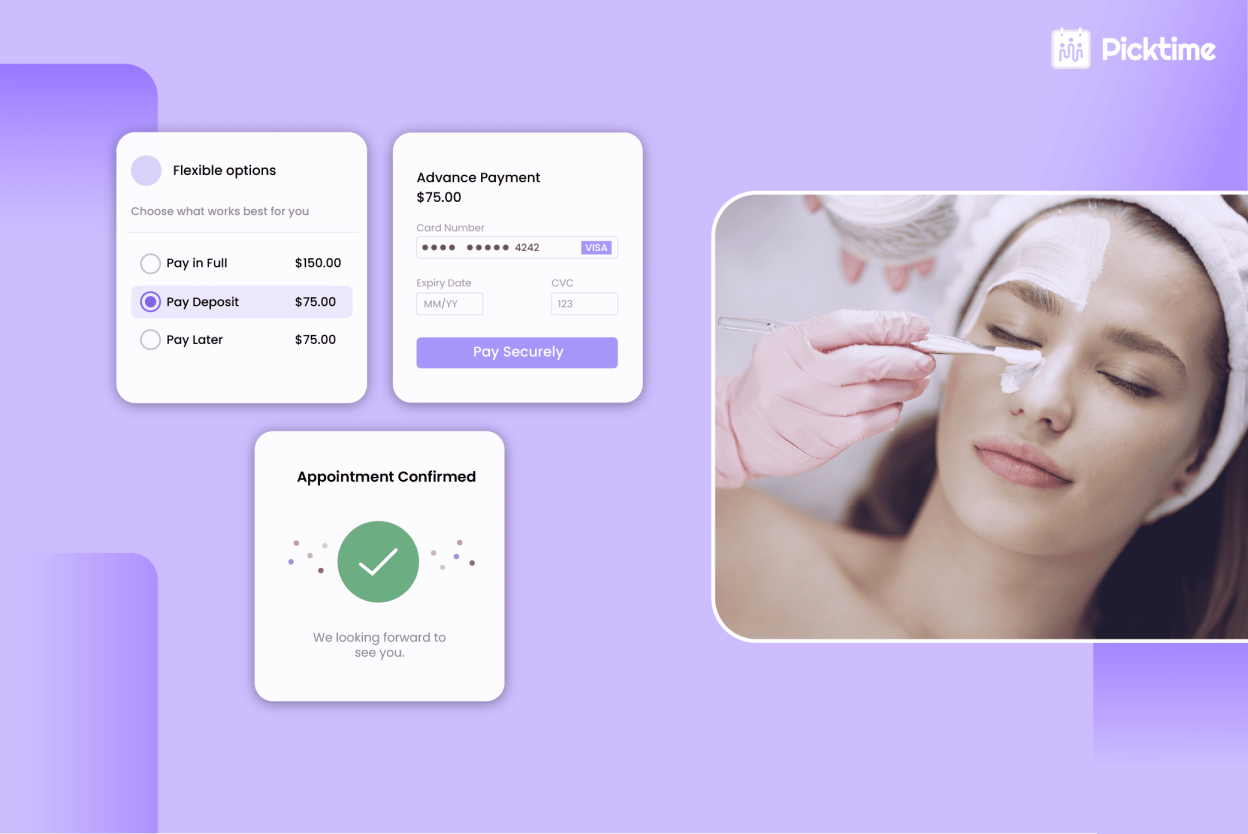
Deposit or partial payment: When a client books an appointment, they pay a set amount upfront. Either a flat fee or a small percentage of the total service cost (typically 20–30%).
This deposit gains trust and tells your med spa, “I’m serious about this appointment.” Later, your assigned team member can collect the remaining balance when the client arrives for their visit.
Full prepayment: Client pays the entire service total at booking. Best suited for package deals, high-demand treatment slots, memberships, and first-time clients, where you have no prior booking history to rely on.
A clearly worded policy at booking, paired with a secure and familiar checkout experience, makes advance payment feel like standard professional practice, not a barrier. Implementing an online scheduling tool like Picktime can help you take advance payments, as you want for your business. It’s specifically designed to make payments easier, faster, and more convenient to manage.
How a Seamless Online Booking and Payment Flow Elevates Your Brand
Here’s something that often gets overlooked in the no-show conversation: online booking with integrated advance payments doesn’t just protect your schedule. It makes your business look and feel more professional.
When your booking experience matches that standard, like 24/7 availability, intuitive, and finishes booking under two minutes. It means that you’re running a modern, premium practice.
Compare that to calling during business hours, waiting for a callback, or bringing a card just to hold the slot. Even if your treatments are exceptional, a clunky booking process sets the wrong tone before the client walks in.
An integrated online booking and online payment flow does the opposite. Clients arrive having already made a financial commitment. They’ve confirmed their appointment, received a professional reminder, and paid, which means they show up in a better headspace. Less friction before the visit translates directly into a better in-person experience and stronger client retention.
For example, med spa businesses using Picktime’s online payment features can reduce the chances of no-shows and last-minute cancellations. It allows easy integration with third-party payment tools, appointment reminders, and registering your own no-show policy.
How Online Booking and Advance Payments Simplify Scheduling
This is the part where most med spa owners expect complexity, but Picktime’s med spa management software was built specifically to make your online bookings and payments easy.
Turn Casual Bookings Into Real Commitments
Reduce no-show and cancellation rates by collecting payment at the moment of booking. Picktime’s med spa scheduling software lets you collect a partial deposit or full payment before a booking is confirmed, so only clients who are genuinely committed make it onto your calendar. You decide the amount, the timing, and which services it applies to. And the rest, you can let Picktime handle the payment automatically. Connecting your Stripe, Square, or PayPal account with your med spa software takes minutes. You don’t need any developer or any complicated setup to take payments how you want.
Reduce The Manual Work That Quietly Eats Your Day
For lean med spa teams, the cost of unpaid bookings is not just the revenue you lose when someone does not show. Picktime’s booking and payment tools work together so that collecting a deposit or full payment becomes part of the booking flow, not an additional task your team handles separately. If payment is made for appointments, you and your team members can generate invoices. As a result, you are not struggling between a booking tool, payment processors, or a spreadsheet just to close one appointment.
Provide an Online Booking Experience, Feel Complete
A lot of med spas have added online booking, but the experience still breaks at a critical moment. Through websites, it often becomes difficult to check availability, find your services, choose a time, and start the process. Picktime’s online booking page lets clients select their service, choose a time, and pay a deposit or full amount in a single, uninterrupted flow. Once your online scheduling software is connected with PayPal, Stripe, and Square, it means your revenues are protected.
Make Your No-Show And Cancellation Policies Enforceable
Let’s be honest, most front desk staff would rather take the loss than have an awkward conversation about cancellation fees. So the policy remains in the confirmation email, and the no-show hurts your business revenue every day. Picktime allows you to create your cancellation and no-show policy and showcase it on the online booking page. When they fit into your workflow, you ensure clients see and accept the term before the appointment is confirmed.
Final Thoughts
No-shows aren’t just an inconvenience. They’re a structural problem with a structural solution. By collecting an advance payment at the moment of booking, your clients can stay committed, your slot is protected, and your revenue is assured. Picktime med spa booking software is built for every kind of team, high-performing operations. It’s especially helpful for owners who wear every hat in the business, practitioner, scheduler, and bookkeeper all in one day.
Ready to reduce the cost of no-shows? See how Picktime online booking and advance payment integrations work together, so your calendar stays full and your revenue stays predictable.
FAQ’s
1. Does Picktime allow me to collect advance payments at the time of booking?
Yes, absolutely. Picktime lets you collect a deposit or full payment before a booking is confirmed. You decide the amount, choose which services it applies to, and set whether you want a flat fee or a percentage of the total.
2. Which payment platforms does Picktime integrate with?
Picktime connects with Stripe, Square, and PayPal. Connecting your account takes just a few minutes. Once it’s connected, payments go directly through your preferred processor and your calendar updates automatically when a booking is confirmed.
3. Does Picktime generate invoices for paid appointments?
Yes. When a payment is collected through Picktime, you and your team can generate invoices directly from the platform. So instead of jumping between a booking tool, a payment processor, and a separate spreadsheet, everything stays in one place. Plus, your records are already organized.
4. What happens if a client needs to cancel after paying a deposit?
Picktime lets you create your own no-show and cancellation policy and display it directly on your online booking page. Clients can see those terms during booking, which creates trust and professionalism.