Key Takeaways:
- Running a tattoo or piercing studio gets messy fast when invoices, payments, and reporting are handled separately.
- Manual invoicing may seem manageable at first, but it quietly eats up time and becomes harder to control as bookings grow.
- Asking for deposits or full payment at booking can do more than collect money upfront. It can also protect your schedule from costly no-shows.
- The right scheduling system doesn’t just organize appointments; it can show you which services, artists, and time periods are actually driving your revenue.
Whether it’s a walk-in flash session or a pre-booked appointment, every appointment at your studio ends the same way. It’s difficult to manage everything at once. It includes handling pending payments, drafting invoices, and reports that shape the future of your tattoo and piercing shop. For most tattoo and piercing shops, the art side of that equation is handled. The business side, not always.
Managing tattoos and piercing sessions is part of your skills. However, handling the billing, payments, and records is an entirely different job. Moreover, most scheduling tools aren’t so great at handling these jobs. This is where tattoo appointment scheduling software like Picktime steps in, connecting the business side so you can focus on the craft.
In this post, we’ll walk you through how to manage billing, payments, and reports more cleanly using the right scheduling tool. Want to stop chasing invoices and start knowing exactly where your money stands? Let’s begin.
How to Manage Billing, Payments, and Reports Effortlessly
The Best Invoicing Experience
Many tattoo and piercing shops still draft invoices without any formal invoicing system. That works fine until an accounting dispute arises, or a partial payment that was never documented. At that point, there’s nothing to point to.
For solo owners, manual invoicing adds another layer of friction. Between pulling up a template, adding session details, and editing when a session takes longer than you’d realize. And each client is taking 15 to 20 minutes. Across a full week, that time adds up fast.
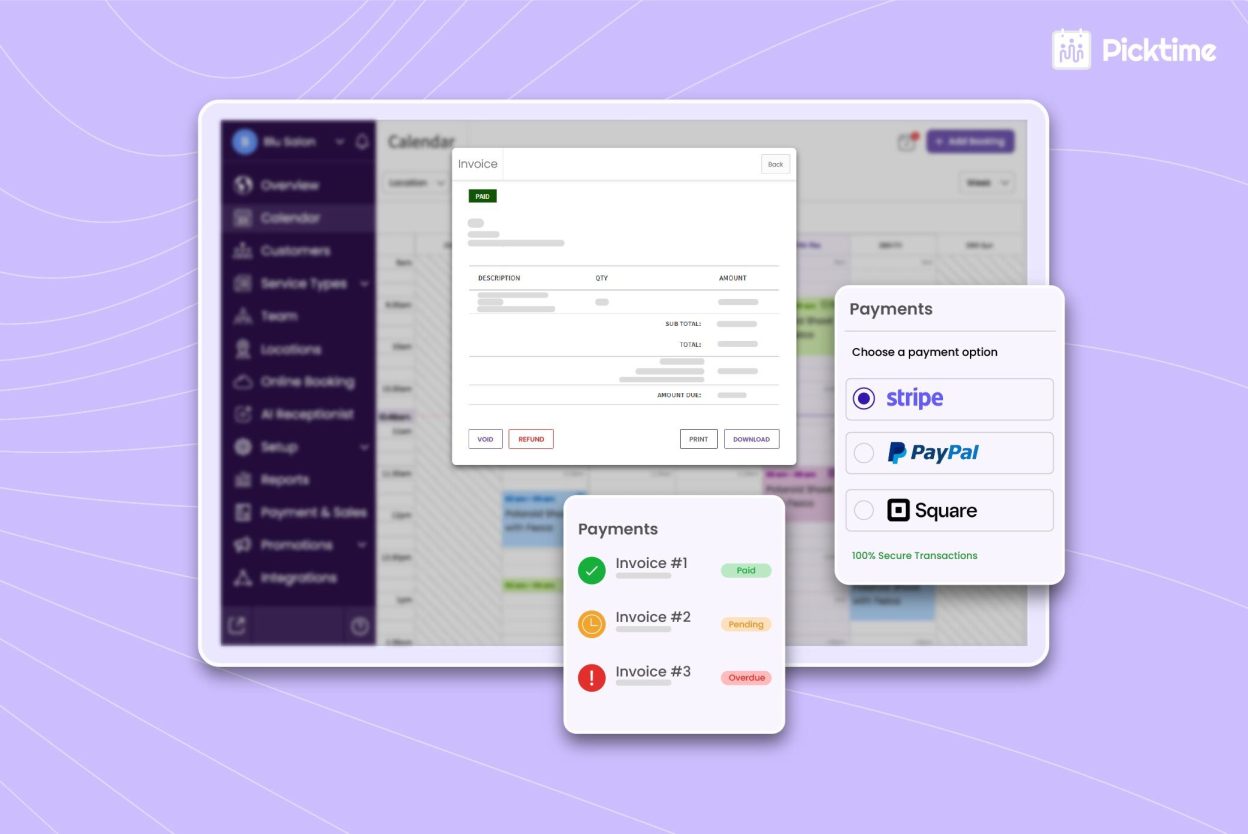
Booking software for tattoo artists like Picktime closes that gap by connecting all your bookings and billing in the same place. The moment an appointment is confirmed, your invoice is already in progress. Here’s what that looks like in practice:
- Invoices are an inevitable part of bookings. The invoice automatically pulls data of each service type, total cost, client name, and appointment date. You don’t have to add any booking details separately or add templates for each booking.
- Edit directly, without starting over. If a session runs longer or the client splits payment across two visits, you update the invoice right there. You won’t end up with duplicate versions or lose track of which one is current.
- You can personalize your invoice so that it matches your brand. Uploading your studio logo takes seconds, and every invoice going out looks like it came from your business.
- You can download or print them anytime. When a client asks for a copy weeks after their session, you can download it in seconds. There’s no chance of losing track of any appointment or its invoices.
Manage All Types Of Payments in One Place
If we ask any solo artist what their biggest business frustration is, no-shows come up fast. Tattoo and piercing shops are especially exposed to this problem because of how far in advance clients tend to book.
Naturally, people believe they’ll remember their appointments. But sometimes life gets busy, and a session booked six weeks out starts to feel less urgent as the date approaches. A client might change their mind, feel nervous about the design, or simply forget. Because most shops don’t ask for any upfront commitment, nothing is pushing them to show up or cancel in advance.
Tattoo studio booking software like Picktime solves this by letting you ask for payment at the time of booking. And it’s not optional. It’s a condition for confirming the slot. You can easily connect your Picktime account with advanced payment tools, such as PayPal, Stripe, or Square. This way, no matter how you want to get paid, you receive the upper hand on your payments. Here’s how you can manage payments with Picktime:
- Set initial deposits or full payment at booking. You can decide whether a partial deposit or the full payment would be best for your business.
- Enforce payment rules based on services. For each tattoo or piercing session, set deposit or cancellation policies, and Picktime applies them during booking.
- Track all payment methods. You can accept payment through cash, card, or other offline payments. It will be reflected in your invoices.
See Exactly How Your Business Is Doing
Most owners of tattoo and piercing shops have a rough sense of how business is going. Busy weeks feel obvious, and slow months hurt. But guessing about the business and actually understanding it are two different things.
Without structured reports, you may not realize which services are working and which are not working. Important questions that most studio owners can’t answer without digging through notes or old spreadsheets include:
- Which services bring in the most revenue per booking?
- Which appointment types have the highest no-show or cancellation rate?
- Which months are historically your slowest, and should you be running a promotion right now?
The best tattoo scheduling software pulls these reports directly from your existing appointment data, so there’s no separate tracking to set up or maintain. With Picktime, your reports work across three key filters:
- By location. If you’re managing more than one studio, you can compare revenue, booking volume, and appointment types across sites.
- By date range. Pull reports for any time window: this January versus last January, Q3 versus Q4, or the past six months all at once. Spotting seasonal patterns becomes straightforward instead of guesswork.
- By appointment type. Not all services perform equally. Seeing the breakdown by service type lets you understand which appointments are actually driving the most revenue, not just filling the most slots.
- By team members. Not every artist at your tattoo shop brings the same revenue. You can have a clear breakdown of which artists are doing great, and where a little encouragement can help your team members.
That visibility changes how you make key business decisions for your tattoo studio. Instead of running a promotion campaign without data, you run it because the data shows your last three Januaries were your lowest-volume months.
Conclusion: Keep Your Tattoo and Piercing Studio Running Smoothly
Running a successful tattoo and piercing studio takes more than creative talent. You also need strong systems to manage records, protect your schedule, and track business performance. For most tattoo and piercing shops, those habits are difficult to build without a proper tattoo appointment scheduling software that actually supports all of them.
Picktime tattoo booking software gives you invoicing features that tie directly to your bookings, payment collection that prevents no-shows before they happen, and detailed reports that show you what’s happening across your entire schedule. All without jumping between tools. It handles the business layer so you can stay focused on the work.
Sign up for free and start using Picktime in your tattoo and piercing shop today.
FAQ’s
1. How does Picktime simplify invoicing for tattoo studios?
Picktime automatically creates invoices from your bookings, pulling in service details, pricing, and client information so you don’t have to enter everything manually.
2. How does Picktime help collect payments to reduce no-shows?
With Picktime, you can ask your clients to pay a full deposit or a partial amount during booking. As a result, they’re more committed to showing up, which reduces last-minute cancellations.
3. What kind of reports can I run with Picktime?
Picktime’s reports pull directly from your existing appointment data. You can filter by location, date range, service type, and team member. That means you can compare revenue across studios, spot your slowest months, and see which services bring in the most per booking.
4. Can I track performance across multiple tattoo shop locations?
Yes. With Picktime’s tattoo booking software, you can compare bookings, revenue, and performance across different locations to understand which shop is performing better.