Imagine running a class that sells out every time. It’s exciting, and a sign that you’re doing something right. However, it’s a thrill, but also a problem, where you’re turning away students who can’t get in. The real challenge isn’t popularity, it’s handling peak hours without disappointing anyone. When the session is full, and someone new wants to join, what happens next? Are they simply turned away, even though they were ready to book?
The solution? The waitlist feature. It helps you avoid last-minute cancellations, stay booked, streamlined, and stress-free.
Let’s take a closer look at how the waitlist feature works and how it simplifies class scheduling for business owners.
What is the Waitlist Feature?
Picktime’s waitlist feature allows students or customers to join a queue when a class reaches its enrollment limit. Rather than giving up completely, interested students can request a spot by filling out your online booking page.
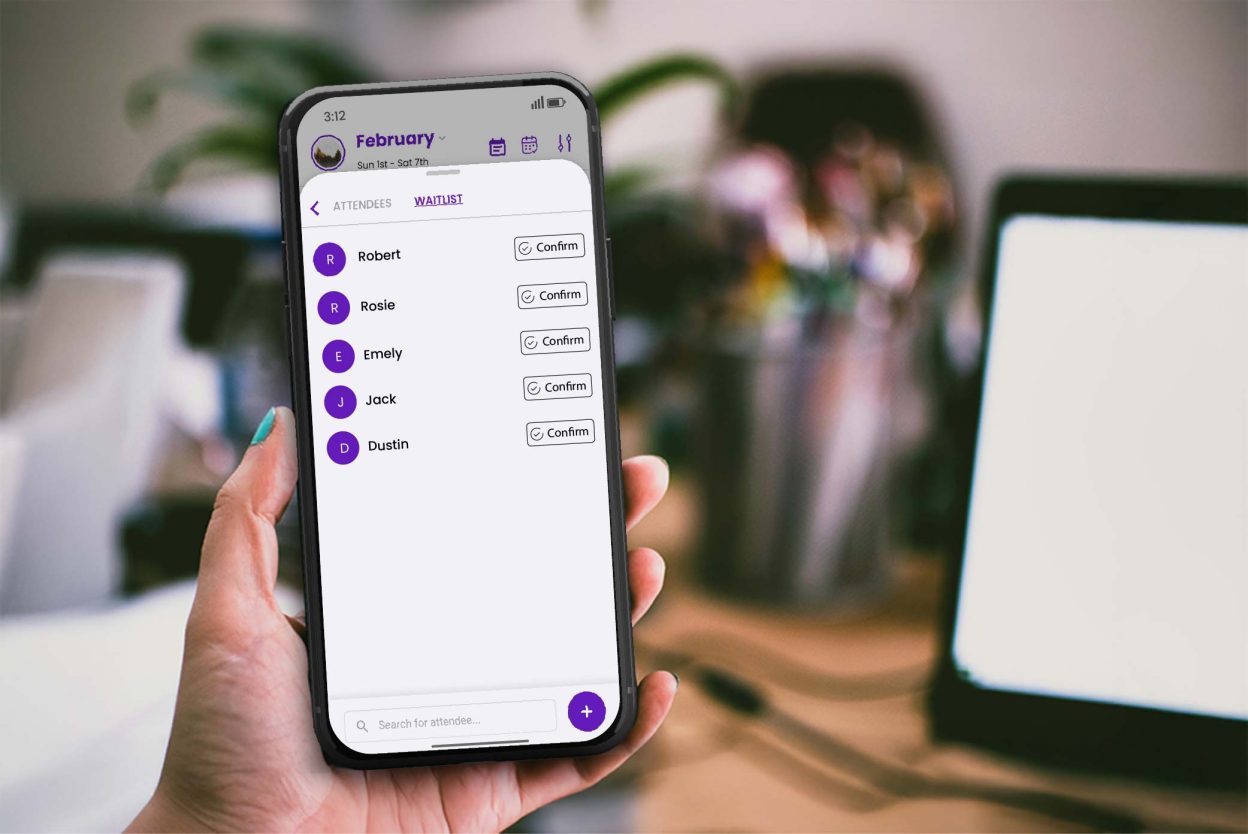
If you enable the waitlist feature of Picktime, the best online scheduling tool, it automatically keeps the requests of students, rather than calling and messaging those interested in joining. When someone cancels, the system will give the vacant seat to the next student on the waitlist. It is smooth, equal, and without any hands.
In short, you can ensure your classes stay organized and 100% booked, without the extra work.
How the Picktime Waitlist Feature Works
For any classes, no-shows and last-minute cancellations can significantly impact your revenue. But Picktime’s waitlist feature helps you quickly adjust if something goes wrong. Implementing a waitlist in your sessions can provide a flexible, convenient benefit to your business, whether you are running yoga, dance, or art classes.
1. Flexible Waitlist and Class Capacity Settings
Based on your class setup, you can easily add students or attendees to your sessions. Whether it’s an educational workshop, a fitness program, or a group training class, Picktime gives you full control to manage your capacity. You can even set your waitlist limit based on either a fixed number of spots or a percentage of the total class size, whichever fits your needs best.
2. Real-Time Visibility into Class Availability
If students book through Picktime’s online booking page, they can easily see the class capacity. It includes the total number of seats available and the remaining spots open on the waitlist once the class is full. This gives your students transparency and helps clients manage their expectations and plan, rather than guessing whether a spot might open up.
3. Automatically Keep Your Classes Full
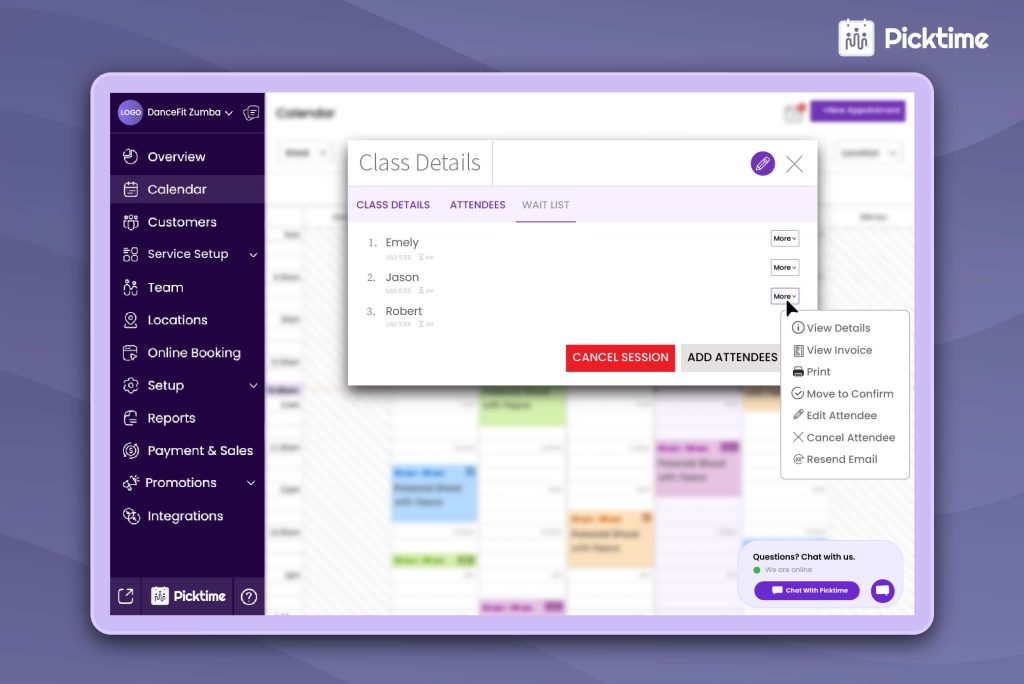
With Picktime’s online calendar, you get a clear, simplified view of everyone attending your classes, along with those on the waitlist. And if a few people happen to cancel, there’s no need to worry. The class booking software automatically fills those empty spots with waitlisted members, keeping your sessions full and your schedule running smoothly, all without any manual effort.
4. Send Instant Notifications
Sending notifications to waitlisted attendees through Picktime is effortless. The moment a spot opens up, it automatically alerts the next person in line; no need to send manual emails or texts. Everything happens automatically with our booking software.
Alternatively, you can also add attendees to your waitlist directly from Picktime’s online booking calendar. It’s quick, simple, and provides the flexibility to include useful details, like their address, notes, or special requests.
Benefits of Implementing the Waitlist Feature in Your Classes
Let’s take a look at how the Picktime waitlist feature not only gives convenience but also helps you thrive in your business.
Fill Gaps and Avoid Last Minute Cancellations
A last-minute dropout might seem small, but it can disrupt how your fitness studio schedules run. A waitlist turns that overflow demand into an organized opportunity. With an automated queue, students can leave notes about availability, while your online booking system easily fills gaps with seats after last-minute cancellations. As a result, it reduces manual follow-ups and leaves students feeling well cared for.
Increase Class Occupancy
Cancellations happen, but your sessions don’t have to be empty. After enabling the waitlist feature, you can automatically notify the next person in the queue and instantly confirm, so sessions stay as full as possible. Over time, this approach keeps headcount consistent and makes per-class earnings more predictable, while students feel included.
Reduce Manual Effort Across Your Team
Instead of calling, texting, or juggling DMs whenever a spot opens, the waitlist feature manages the queue, sends customizable notifications, and tracks confirmations end-to-end. Automated reminders can give students a quick nudge about their confirmed slots. This helps you get that time back to teach, support your students, and deliver a better experience.
Improve the Student Experience & Loyalty
Picktime’s waitlist feature lets students know they’re still in line. Even when a class is full, they still have a fair chance to attend on a first-come, first-served basis. Whenever they secure a spot through the waitlist, they know exactly when their class is, without any last-minute surprises. By doing this, you can make them feel considered, you remove the hassle of managing back-and-forth communication, and earn the kind of trust that keeps them coming back.
Increase Your Working Hours
Picktime’s waitlist takes the stress out of cancellations and late-night follow-ups. When someone cancels, the next person in line automatically gets a message letting them know a spot has opened up. They can confirm right away, and if you’d like, you can even require a small deposit to confirm an appointment.
Smarter Demand Insights
When you use Picktime, managing peak hours and popular classes is quick and easy. Whether it’s a time, a popular instructor, or a class format, you can add a waitlist feature and set a limit on how many people can join through your booking process. It helps you create trial sessions during high-demand times or to experiment with pricing and packages of high-demand services.
Step-By-Step Guidance to Add Waitlist Feature
With Picktime, setting up a waitlist is quick and straightforward. Here’s how you can start adding students to your waitlist in just a few steps:
Step 1: Log in to Picktime and go to Classes & Services. Select the class you want to manage (or create a new one) and open its settings.
Step 2: In the Class Settings, enable the Waitlist for the class, then set the limit, either a fixed number of students (like 10) or a percentage of the class capacity.
Step 3: Once the waitlist is active, you can add students from your bookings/students list (or let them join when the class is full).
Step 4: Save your changes, and our software can send an email/SMS confirmation letting students know they’ve been added to the waitlist.
Conclusion: Keep Your Calendar Moving
Managing last-minute cancellations doesn’t have to mean losing revenue or profitability. If you enable Picktime’s waitlist feature, you can ensure your online calendar is filled, and participants are valued. It will save you hundreds of hours of manual labor by automating class scheduling, automated notifications, and eliminating missed opportunities. Regardless of whether your classes, appointments, or workshops are full, the waitlist will fill all the open positions and make every attendee feel appreciated.
The online appointment scheduling software developed by Picktime allows you to keep your business organized and work smarter while growing your business. It’s a simple way to grow your classes, make students happier, and keep every session running at full capacity. Start using Picktime’s Waitlist feature today and see how effortless class scheduling can be.