Key Takeaways:
- Scheduling complexity grows faster than your team does. The right system doesn’t just keep up, it makes your schedule organised.
- Balanced workloads protect your team’s best work. Round Robin distribution doesn’t just make your scheduling perfect. It’s how you keep a healthy balance between your fellow team members.
- Life got busy, the reminder never came, and that appointment slipped. Automated confirmations and timely follow-ups turn potential gaps into filled slots without you chasing anyone.
- Knowing who has access to what is not just a privacy concern. The Lash salon app provides powerful features that help make management decisions that shape how your whole studio operates daily.
Managing technician schedules sounds simple until your salon gets busy. In the beginning, it may only involve checking your own calendar and replying to clients when you have time. Eventually, as more services, more technicians, and more client preferences enter the picture, every small scheduling task starts to connect to something else.
A client does not just need “an appointment.” They need the right service, with the right technician, at a time that works for both sides. Each booking needs the right details before it gets confirmed. For example, a lash extension appointment may require a longer duration, or a lash tech may only be available at certain times. Once those details pile up, as a business owner, you might lose track of time and get distracted from your actual task.
In this post, we’ll walk you through where manual scheduling breaks down, which features actually matter in a lash salon app, and how Picktime solves the real problems many lash technicians face every week. Want to stop running your front desk manually from your phone late at night? Let’s begin.
Table of Contents
The Challenges of Handling Your Technician Schedules
Whether you are a solo lash pro or a studio owner who manages multiple locations, managing your business with manual scheduling comes with its own set of challenges. Here’s what a typical scheduling task looks like without a proper system in place:
- A lash artist is still finishing a volume of appointments, and another client has already booked that same slot.
- A same-day cancellation came in that morning, but you only spotted it hours later, and that slot is now sitting empty.
- You forgot to block out your own break, and an appointment for a full set somehow landed right in the middle of it.
Honestly, “Clients judge you by the little details.” One scheduling overlap sends a clear message about how your studio runs. And in a service as detail-driven as lash work, where clients come back every few weeks for their infills, that impression is hard to shake. Losing even one loyal client over a calendar error quietly takes a real bite out of your yearly revenue.
When your only intake process is a DM, clients can end up booked with the wrong artist for the wrong service entirely. A client who wants a simple classic set may accidentally book with a specialist whose pricing is meant for more advanced services. Another client may choose a standard infill but arrive with eyebrows that need extra removal, repair, or a longer appointment. These mix-ups can delay your schedule and leave you explaining price differences when your focus should be on the service.
Key Team Scheduling Features to Look For in a Lash Salon App
Not every lash salon app is built for service-based team members. A generic calendar app might be suitable for a solo lash studio. But when you are managing a diverse team with a different service list, location, and working hours, it’s difficult to manage each task with different tools simultaneously.
Individual Team Profiles With Own Service Menus
Your artists don’t offer the same services at the same prices. For example, one focuses on classic and hybrid sets, another specializes in volume and mega volume applications, and a third offers lash lifts and brow lamination. The right lash salon app lets you build out individual team profiles that specify exactly which services each person offers, at what price, and how long each appointment runs.
As a result, when clients book online, they only see the artists and services that actually match what they’re looking for. No wrong bookings and no clients are walking in expecting a service a particular artist isn’t trained for. And when you bring on someone new, you’re not reworking your whole setup. You’re simply adding a new team member profile.
Round Robin Appointment Scheduling
Round Robin automatically distributes new bookings across your available artists in equal turns. Without the feature, it burns out your top artist and leaves the rest of your crew not booked through no fault of their own.
If a client books online without specifying a preference, the platform assigns them to whichever artist is next in the rotation and free for that window. The workload stays balanced on its own, without you having to step in and redistribute appointments manually. Over the course of a week, each artist ends up handling a similar volume of new clients, keeping the whole team energized constantly.
Automated Appointment Notifications
Every no-show is a reminder that never went out. A good lash salon app sends confirmation and reminders whenever a booking is made. Whether it’s a confirmation, reschedule, or cancellation, your team members won’t face any double bookings. They will receive notifications right away without you manually updating the calendar. It ensures that you have a genuine shot at filling a dropped slot before the day starts.
Before the day starts, all lash technicians in your team will receive an email which comprises the entire list of scheduled appointments. Your team members can plan their day without checking their schedules back and forth. Moreover, it not only saves their time but also helps them to excel in their work, without you lifting a finger.
Real-Time Calendar Sync
Using a two-way calendar sync for your fellow lash technicians prevents conflicts between personal and work schedules. If a technician has blocked a time in their personal calendar, your lash salon app should be able to reflect it on your real-time schedule. Whether your team has work commitments or wants to save time for personal time, the right lash extensions appointment software manages multiple calendars without any manual help. This means your calendars stay connected, and you don’t have to update the same information multiple times.
Online Booking Page With Team Member Selection
A branded and customizable booking page is essential for lash technicians. Having an online booking page for your lash studio allows your clients to book appointments without messaging your team members first. However, you should personalize your online booking page in such a manner that your available services, technician options, time slots, prices, and basic appointment details are clear. Additionally, your team members or your front desk employee don’t have to explain every detail individually.
Permission Access and Role-Based Controls
No matter the size of your lash technician team, you should have control over your team. A technician may need to check their own schedules, full client history, your studio’s overview, or the ability to shift a colleague’s day around. With the lash salon app, you can set role-based access, which lets you assign each team member a level of visibility that matches their role. You, as a lash studio owner, can keep a complete track of your entire operation.
Why Picktime Is the Most Suitable Scheduling App for Lash Salons
By now, you’re probably thinking: which platform actually delivers all of this without requiring a week of setup? No need to worry. A scheduling tool like Picktime checks every box.
This is where Picktime’s lash salon app steps in, shifting the entire team management process. It’s the best booking app for lash artists because it was built for appointment-based, team-driven studios exactly like yours. Let’s explore which team scheduling features Picktime provide:
Mobile Scheduling App
With a mobile scheduling app, your lash technicians can easily check their schedules from anywhere. Suppose your team member wants to change their shift or add a break; they can make changes with Picktime’s scheduling app. As an admin, you can also check their schedule from your device.
Round Robin That Keeps Your Team Balanced
Picktime’s round-robin features help you rotate the lash and brow filling bookings across all your available artists in a repeated flow. You can distribute assignments based on who’s next in the queue and free at that time. This is an easy way to keep your team balanced and organized. It’s the end of the conversations about why one artist’s week is packed, and another’s is half empty.
Individual Team Profiles
Each lash technician can create their individual team member profile with Picktime. Lash studio owners or managers can set the service list, location, and pricing, and their own working hours for their team members. Beyond that, Picktime eyelashes salon salon scheduling software makes it easier for lash artists to manage different schedules and service types. Hence, if one member of your team handles lash extensions and the other focuses on brow tinting. There are no scheduling mistakes, and clients only see accurate slots while booking.
Automated Reminders & Notification
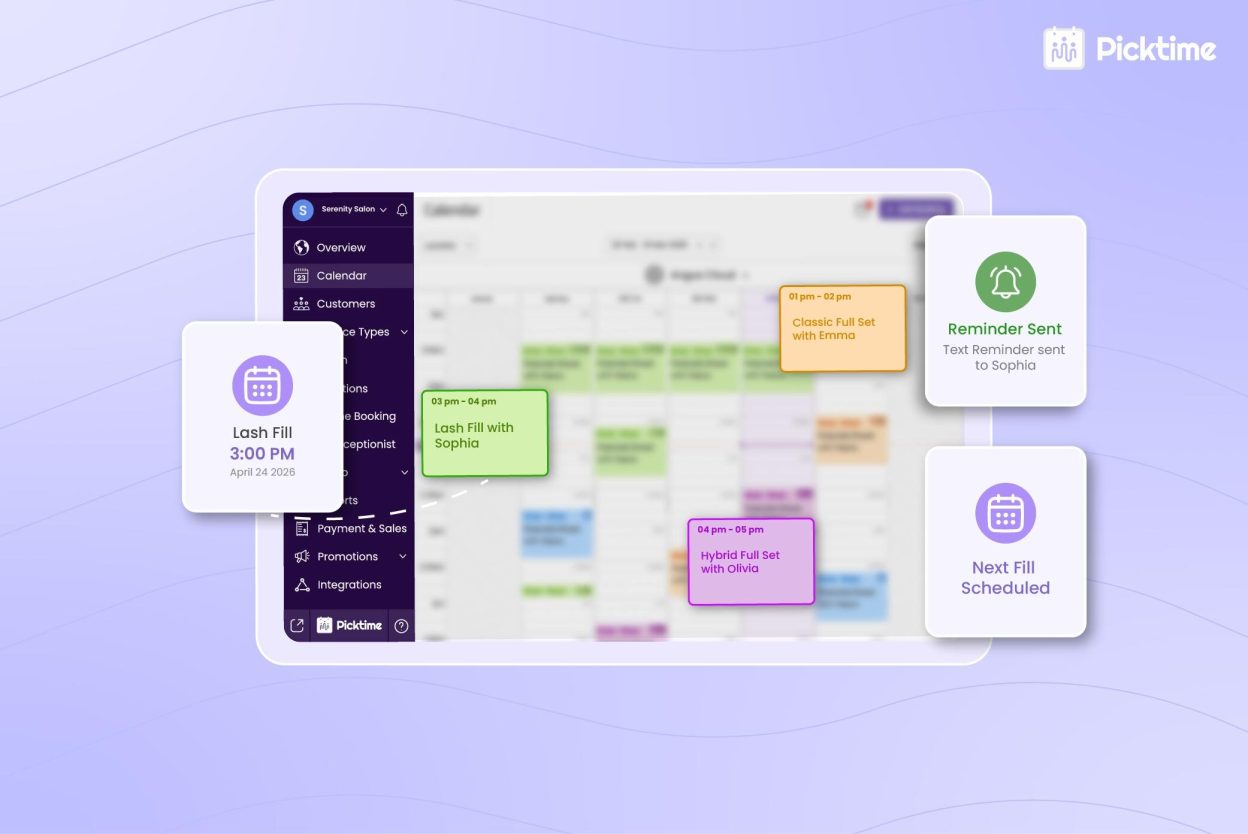
Picktime sends confirmation emails and SMS messages at the intervals you set, every time, without you touching a thing. Clients can cancel or reschedule directly from that message, and your Picktime calendar updates instantly. You walk into each morning already knowing who’s confirmed and who needs a follow-up.
Permission Controls That Protect Your Studio
As your team grows, Picktime’s role-based access keeps things clean. Each lash artist manages her own day without touching anyone else’s, and you keep full visibility over the entire operation. And let’s be honest: when too many people have unrestricted access to a shared dashboard, things may go sideways. Picktime makes sure they only have access to what they need, with permission-based controls.
Reports That Show You the Full Picture
Picktime’s built-in dashboard gives you appointment volume by artist, revenue by service type, and trend data over time. You’ll know which services to double down on and which team member might need support.
Conclusion: Your Schedule, Finally Under Control
Managing your team’s day-to-day schedule by hand shouldn’t be the thing holding you back from doing more of it. Round Robin distribution, automated reminders, individual team profiles, real-time calendar sync, and role-based access help your lash salon run smoothly. They’re the difference between a studio that runs on stress and one that runs on smart systems.
Picktime’s lash salon app transforms the entire operation. It’s the best appointment scheduling app for lash technicians because it was built for exactly this kind of business. It makes it much easier for lash salons to handle their team management effortlessly.
Sign up for Picktime lash bar salon software today and keep your lash studio’s schedule running without the constant back-and-forth.
FAQ’s
1. Can lash technicians manage their own schedules within Picktime?
Yes, absolutely. Picktime’s access level controls let each artist log in and handle their appointments, adding personal time. Everyone focuses on their work, and the software handles the rest.
2. Can clients choose a specific artist when booking online?
Yes, they can. Picktime customer booking page displays individual team members, their services and available time slots. Clients can choose their preferred lash technician directly, or you can configure the platform to assign the next available artist automatically.
3. How does Round Robin scheduling work in practice?
When a client books online without specifying a preferred lash artist, Picktime’s Round Robin assigns the appointment to the next team member in the rotation who has an available time slot at that time. It rotates through your crew in equal turns so the workload stays evenly distributed.
4. Can Picktime handle multiple services with different durations per artist?
Yes, you can. Each team member profile in Picktime supports individual appointment lengths. You can assign different team members to different locations. Without any mistakes, our scheduling platform handles everything.