Key Takeaways:
- Your next booking does not always happen during salon hours. Online scheduling helps clients reserve a slot the moment they are ready, even when your team is busy, closed, or away from the phone.
- A strong booking page does more than show open times. It helps clients understand your services, compare prices, choose their preferred stylist, and book without waiting for a reply.
- Longer services need stronger commitment. Online deposits and payments make color appointments, bridal styling, smoothing treatments, and premium services easier to secure.
- Picktime’s Hair Salon Software brings bookings, team schedules, payments, reminders, and client details into one simple dashboard.
Imagine you’ve just posted a beautiful photo and videos on your social media profiles. Because you want customers to see those testimonials and book those services. And your customers expect an easier way so that they can schedule your listing services instantly. As a hair salon owner, you might want your clients to know about your services before they even book your salon. The solution? By incorporating online scheduling in a hair salon, you can increase the number of bookings, enhance customer satisfaction, and boost conversion.
When customers can book their service on their own, get flexibility and convenience, they are more likely to come back to your hair salon business. Here, we discover the actionable strategies to increase bookings in your salon.
Table of Contents
6 Ways Online Booking Helps Your Hair Salon Get More Appointments
The first thing you should consider before including online booking is choosing the right hair salon booking software. The software should have all the powerful features and integration that support online scheduling. Plus, ensure it supports features like an online booking page, appointment reminders, advance payments, coupons, and reviews. Here’s what actually changes once your booking shifts online.
1. Clients Book When They Are Ready
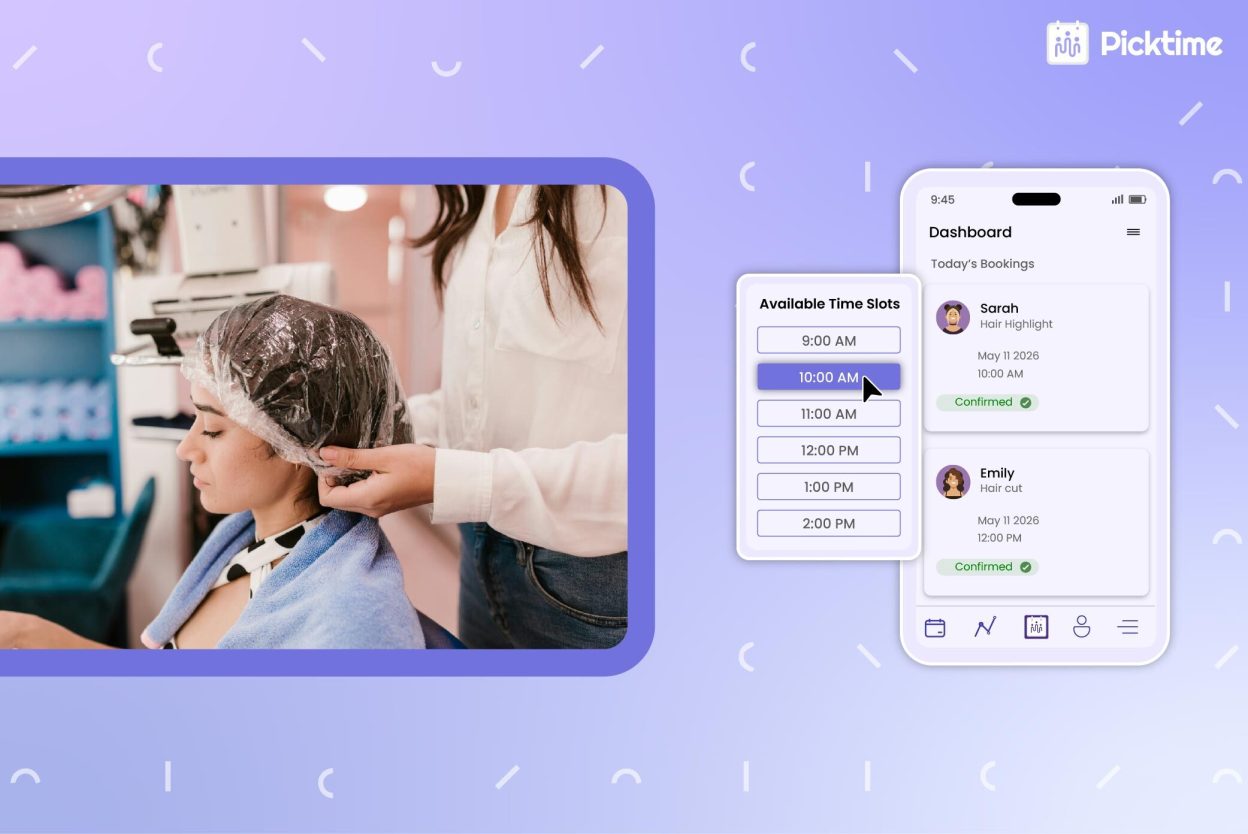
Clients rarely think about having a haircut between working hours. Since every client is busy with their work, everyone books after business hours or on the weekend. With 24/7 online scheduling support, you can highlight multiple services, like hairwash, hair braiding, hair styling, hair-cut, and more. For separate services, you can also set pricing, team members, locations, and add a welcome note to your online booking page. And the client can pick their services, choose a preferred stylist, and confirm a slot without waiting for anyone to pick up the phone.
Example: A bridal client browsing on Sunday night could lock in a Tuesday trial run in under a minute, without sending a single message.
2. Simplify Team Scheduling Jobs
Busy salons and their team members often get distracted by the same repetitive tasks. Sometimes, your team members get questions like “What time do you have available?” “How much is a haircut?” “Can I book with Jessica?” These questions might sound simple and basic, but they shift your team’s focus away from the client in the chair.
Use an online scheduling system to automate your entire team’s scheduling jobs. Picktime’s calendar sync feature can help here. Whenever any team member blocks off a time or is occupied, those schedules automatically sync to the Picktime calendar. It means there’s no confusion, no double-bookings, and clients can book open times on their own, while your team focuses on what they actually opened the salon to do.
Example: A solo stylist could free up close to an hour a day just by sending a booking link instead of fielding calls between appointments.
3. Real-Time Availability Prevents Double Bookings
As a hair salon business owner, when you rely on traditional scheduling approaches, clients can get overwhelmed. One client books over the phone, another messages on Instagram, and a stylist blocks time on a personal calendar. Suddenly, your schedule is hard to trust.
Whether any client reserves a slot, reschedules, or cancels any stylist appointment, the system keeps the booking page accurate, and the client always sees real-time appointment slots. Use buffer times in between appointments to make sure your stylist team gets breathing space. It also ensures that, team, if a service takes longer than usual, your scheduled appointments won’t overlap.
Example: A salon that offers both quick trims and full balayage sessions could let the system block 3 hours for color work without manual math every time.
4. Automated Reminders Keep Clients Updated
No-shows sting because the time is already gone. The chair was blocked, the stylist was ready, and another client could have taken that slot. A confirmation message after booking, a reminder the day before, and a same-day nudge keep appointments fresh in the client’s mind. Research on dental practices found that automated reminders cut no-shows by nearly 23% across 1.6 million appointments. Salons aren’t dental offices, but the behavior is similar. People get busy, and timely reminders help them show up.
Example: A quick “Your hair stylist appointment is tomorrow at 10 a.m., see you soon!” text could noticeably reduce last-minute no-shows.
5. Online Payments and Deposits Make Bookings Stick
Some appointments need more protection than others. A quick trim is easy to refill, but a long color correction, bridal styling session, or smoothing treatment can take half a day.
When clients pay a deposit or the full amount in advance, they take the booking more seriously. It also protects your revenue when someone cancels at the last minute. Picktime supports popular payment systems like PayPal, Stripe, and Square, so you can collect deposits and payments without any awkward follow-ups.
Example: A salon could ask for a 25% deposit on services over 90 minutes and watch late cancellations drop almost overnight.
6. Setting Recurring Sessions Becomes Easy
Repeat clients are the backbone of a healthy salon calendar. The easier it is for them to rebook, the more likely they are to return on time. After a haircut, a client may need another visit in six weeks. After color, they may need a toner refresh in four. Online scheduling makes rebooking part of the experience instead of an afterthought.
Example: A stylist could hand a client a quick booking link at checkout and lock in their next visit before they ever leave the chair.
How to Set Up Online Booking Page for Your Hair Salon
Setting up a Picktime online booking page doesn’t need to feel like a tech project. The goal is to match the way your salon already works.
Step 1: Add Your Core Services
Start with what you book most often. Women’s haircut, men’s haircut, blowout, root touch-up, full color, highlights, balayage, hair treatments, and bridal styling. Add price, duration, and a short description for each one.
Step 2: Set Each Stylist’s Availability
Every stylist has different working hours and skills. One may handle color, another may focus on cuts and styling. With Picktime, your stylist can add their working hours, breaks, buffer time, and weekends, so clients always book with the right person.
Step 3: Create Booking Rules
Decide how far in advance clients can book, how late they can cancel, and which services need buffer time. For instance, you may allow haircut bookings up to two hours before the slot but require 24 hours’ notice for color services.
Step 4: Turn On Automated Reminders
Start with one confirmation after booking and one reminder 24 hours before the appointment. For longer services, add prep notes like “Please arrive with clean, dry hair and plan for a longer visit.”
Step 5: Connect Your Calendars
Picktime supports two-way calendar sync with your personal calendars, like Google Calendar, Outlook, Microsoft 365, Apple, and Exchange Calendar. This two-way calendar sync feature keeps your personal schedules and salon hours from colliding.
Step 6: Share Your Booking Link Everywhere
Add booking links to your website, Instagram bio, Google Business Profile, Facebook page, email signature, and SMS replies. The faster clients find it, the faster they are likely to book.
How Picktime’s Hair Salon Software Supports Growing Salons
Picktime is built for independent stylists, small teams, and growing salons that need a simpler way to manage bookings. Clients can book online 24/7, while your team manages walk-ins, reminders, payments, and customer details from a single dashboard. Calendars stay in sync, follow-ups happen automatically, and your booking page works around the clock so you don’t have to.
It’s like having a quiet receptionist who never sleeps, never misses a message, and never forgets to confirm an appointment.
Conclusion: More Bookings, Less Back-and-Forth
Implementing these online scheduling strategies helps your hair salon get more appointments booked. It removes all scheduling nightmares, organizing all appointment schedules, payments, and reminders in one place. Consider using features, like payments, confirmation messages, discounts, and promotions in Picktime’s online scheduling system. For example, clients can apply available discounts and pay for their scheduled services online without relying on your front desk employee.
In short, when you add Picktime’s hair salon booking software to your day-to-day operations, it completes your job faster while maintaining long-lasting relationships with clients. It also saves time and money for your growing hair salon business, while allowing you to focus on creating better services and hiring the best stylists for your business.
Sign up for Picktime now and give your clients a smoother way to book, while your team finally gets a calmer workday.
FAQ’s
1. What features should good Hair Salon Software include?
Good hair salon software should include all advanced features and integration in one dashboard. You’ll get an online booking page, team management, automated reminders, online payments, customer profile, and more.
2. How does Picktime help with stylist scheduling?
Picktime lets salons assign specific services, working hours, availability, and access permissions to each stylist. When clients book online, they only see time slots that match the selected service and the stylist’s real-time availability, helping salons avoid scheduling conflicts and double bookings.
3. Can salons collect deposits through online booking?
Yes. With Picktime, salons can accept online payments and deposits from clients through preferred payment providers like PayPal, Stripe, and Square.
4. Is scheduling software for hair salons useful for small salons?
Yes. Scheduling software is especially useful for small salons and independent stylists because it helps reduce time spent on manual and repetitive admin tasks.