Key Takeaways:
- Business reports bring booking, revenue, cancellation, and service data into one clear view.
- Booking reports show which services, time slots, and team members receive the most appointments.
- Revenue reports help you see which services and locations bring in the most income.
- Service demand reports make it easier to plan staffing, availability, and promotions.
Whether you run salons, fitness studios, or consulting firms, managing admin tasks can be challenging. If your business is growing so fast, you may require clear visibility of which services are performing well, how much revenue is coming in, and how often clients cancel a service. Without clear and fast business reports, you may make decisions based on your guesswork rather than what your booking data is really showing. If you have weekly, monthly, and yearly reports, they can prevent unexpected scheduling problems and improve your company’s financial situation.
However, if team members spend more time on them, they have less time for higher-value tasks. It can directly impact your business, leaving your clients unsatisfied or your team members stretched too thin. Let’s explore how booking reports turn daily appointment activity into useful information and show which areas need attention.
Table of Contents
Why Booking Reports Matter for Your Business
Business reports are the most effective way to bring your company’s data together and show it in a clear, useful format. They allow business owners and managers to see what is working, where errors may be developing, and which services need more attention.
These booking reports are useful because they offer an overall picture of a business’s performance. By generating reports, you can actually monitor your business’s performance, such as revenue, expenses, bookings, or legal requirements. Reports can be helpful in creating new pricing, new hiring posts, or introducing new services.
Types of Business Reports
To run businesses successfully, you need different business reporting features based on what area you want to focus on. These reports help you spot business trends, understand how your marketing efforts are performing, and get a clearer picture of your revenue and profitability.
Here are examples of a few reports:
- Financial or revenue reporting
- Service demand reports
- Summarized bookings
- No-shows or last-minute cancellation reports
Using appointment scheduling software like Picktime, you can get the above-mentioned reports to meet your unique scheduling needs. The data you get from these reports can improve scheduling, adjust services, and make decisions that support long-term growth.
How to Track Bookings, Revenue, and Service Demand
See What Drives Your Bookings
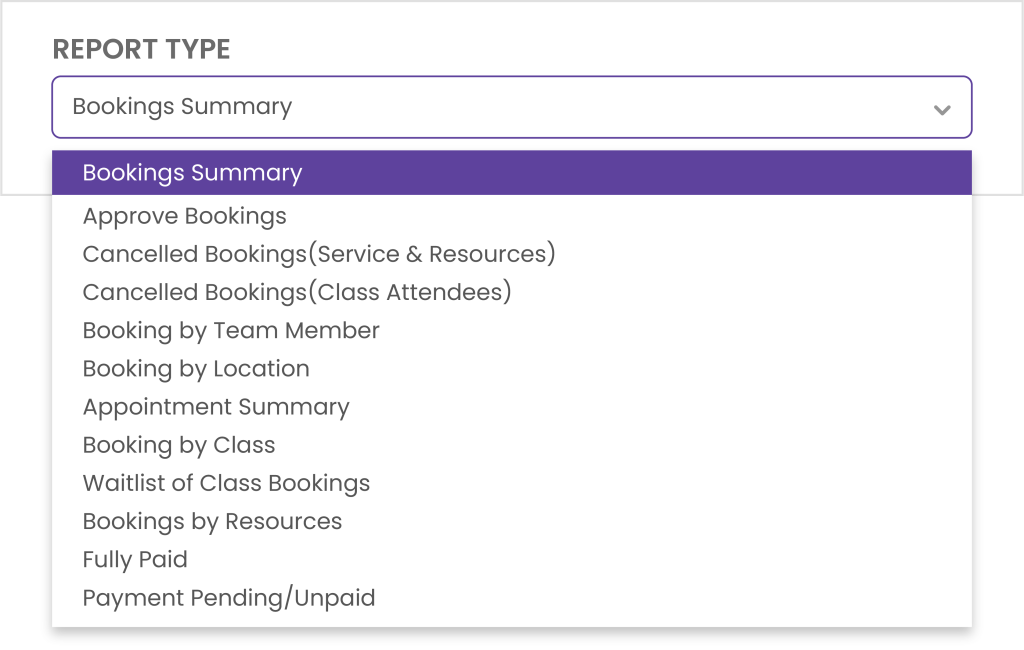
Booking volume can reveal more than how busy your work calendar is. Using Picktime, you can get reports on your existing bookings. Therefore, you don’t have to switch between multiple apps. Moreover, you can easily see breakdowns at a glance by filtering services, locations, and team members. These reports give your managers clear answers to these questions:
- Which services are clients scheduling most often?
- Which specific slots and services fill up fastest?
- Which team members manage the most bookings?
Once these patterns become clear, you can adjust schedules with more confidence and give clients better access to popular services.
Connect Revenue With Booking Activity
High revenue may seem thrilling, but it does not explain where the profit came from. Business reports present where the income is coming from, team members’ performance, locations, and appointment trends. It can further show staff, promote awesome services, or review pricing for low-margin bookings.
One location may record more appointments, yet another may bring in higher revenue per booking. A clear comparison can guide pricing, staffing, and local marketing choices. You might promote a premium service, open more high-demand hours, or review the price of a popular option with low margins.
Plan Around Service Demand
Demand changes across seasons, locations, and client groups. Business Reports help you spot shifts early, prepare for busy periods, and reduce unused time. If one service receives little interest for several months, review its price, description, availability, or placement on your booking page. When another service keeps growing, open more time slots or train more team members to provide it. These choices can improve staff use, protect revenue, and make booking easier for clients.
Turn Booking Reports Into Better Decisions
Managing a business takes more than creative talent. You also need advanced ways to manage booking records, protect your appointments, and track business metrics. For most businesses, better work management needs proper online scheduling software.
Picktime’s reporting features give you a clearer view of how your business is performing. You can use reports to track bookings, revenue, cancellations, team activity, and service demand. These insights can support better decisions about staffing, schedules, services, and overall business growth. You can also download reports in CSV or PDF format, or print them when you need a physical copy for meetings, records, or further review.
👉 Sign up for Picktime and start turning your booking data into smarter business decisions.
FAQs
1. What are Booking Reports?
Business reports give you a clearer view of how your business is performing. With Picktime, you can review bookings, revenue, cancellations, popular services, team activity, and location performance. These insights can help you make better decisions about staffing, schedules, services, and day-to-day operations.
2. How often should a business review its reports?
It depends on what you want to measure. With Picktime, you can review reports regularly and filter them by date range to focus on the information that matters most. Weekly, monthly, and yearly reports are useful to know overall performance of your business.
3. Which business reports are useful for appointment-based businesses?
Appointment-based businesses can benefit from booking, revenue, cancellation, service, and location reports. Picktime brings this information together in one place, which makes it easier to identify busy periods, popular services, booking trends, and areas that may need improvement.
4. How can reports improve the client experience?
Reports can help you understand when customers prefer to book, which services they choose most often, and where scheduling issues may occur. With Picktime, you can track bookings, cancellations, revenue, team activity, and service demand in one place, helping you make practical changes that improve the booking experience for your clients.