Key Takeaways:
- Resource management software helps businesses allocate people, equipment, rooms, and other resources efficiently.
- Scheduling software helps organize appointments, reservations, staff availability, and bookable time slots.
- Project-focused businesses often need deeper resource planning, capacity, and utilization features.
- Service businesses usually benefit more from appointment scheduling combined with staff and resource availability.
- Businesses that schedule customers along with rooms or equipment may benefit from software that supports both.
For many professionals, coordinating tasks, winning more jobs, and delivering better services are the top priorities. With dozens of tasks and hundreds of concurrent projects, managing employees’ availability, client communications, and resource management becomes difficult. Modern business tools make it easier for business owners and change the way they manage day-to-day operations while providing customers with a smoother, more convenient experience.
That’s where resource management software and scheduling software make workforce management easier for businesses. However, before choosing any tools, you should know how these two tools work together, which businesses benefit most, and which features matter most. This guide will help you compare resource management systems and scheduling software, see how each one supports different scheduling needs, and choose the right option for your business.
Table of Contents
Understanding Resource Management Software vs. Scheduling Software
Want to manage both appointment scheduling and resources? If you run a wellness center, government & corporate offices, or salons that rely on appointment-based services, managing staff, rooms, and equipment becomes essential. Scheduling software lets business owners manage appointment times and availability, while resource management tools make it easy to manage the team, spaces, and equipment behind those appointments.
When you use separate tools for different jobs, they can create another problem. Therefore, your team members might end up juggling different systems and calendars just to update schedules across different places.
Important Characteristics of Resource Management System
A resource management system lets business owners rent out their resources and helps them plan, schedule, and allocate them across different services. The system will also let you add location, pricing, duration, and availability throughout the week based on different resource requirements. Here are the common functionalities of the system:
- Resource allocation: If you manage services, scheduling software makes it easier to organize rooms, equipment, and other resources in one place. You can set each resource’s availability, capacity, and pricing, so clients can book their preferred resources.
- Let Clients Reserve Resources 24/7: Clients can book available rooms, equipment, or other resources whenever it suits them. Through the online booking page, clients can check open time slots and reserve what they need without calling or waiting for your team to confirm availability.
- Unique Booking Page Link & QR Code: You can give each resource its own booking link and QR code, so clients can go straight to the resource they want to book without searching through the full booking page. If you offer multiple resources, providing clients resource-specific booking page links for each can reduce the confusion and make booking much easier.
- Check Live Resource utilization: Review booking reports for details on how frequently people or assets are being used and identify resources with unused capacity.
For project-based services, this kind of software is helpful when the bigger problem isn’t simply booking a time. If a service or class needs a particular room or piece of equipment, you can connect the resource directly to it. It offers plenty of features, including reporting and analytics, to make data-driven decisions for better growth. For example, a co-working space may need to rent out its conference rooms, while a pickleball training center may want to rent out its courts.
Important Characteristics of Scheduling Software
Appointment scheduling software offers 24/7 online bookings, empowering clients to schedule appointments at their convenience. Research shows almost 75% of patients use digital scheduling tools to schedule appointments. With its advanced features, it helps to reduce scheduling errors that can cause double bookings, no-shows, and more. Here are more features:
- Online booking: Customers can choose available appointment times without contacting the business for every booking.
- Calendar management: Employees can view appointments and availability from an organized schedule.
- Calendar synchronization: Business and personal calendars can be connected to reduce scheduling conflicts.
- Automated reminders: Email or SMS reminders can help customers remember upcoming appointments.
- Staff availability: Businesses can control when individual team members are available for specific services.
- Multiple locations: Businesses with several branches can organize appointments and availability by location.
Picktime’s online scheduling software brings powerful features to manage appointments and resources in one place, such as online booking, calendar synchronization, team management, reminders, resource scheduling, and multi-location management. Clients can easily choose a service, see available appointment times, rent resources, and pay in one place.
Resource Management Software vs. Scheduling Software: Which Businesses Need Each?
The right choice depends less on the size of your company and more on what you need to coordinate every day.
Scheduling Software Is a Good Fit For
- Health and wellness practices: Clinics, therapists, wellness providers, and similar businesses can coordinate client appointments, provider availability, rooms, and service times.
- Beauty and personal care businesses: Salons, spas, and other appointment-based businesses can organize staff calendars and let customers choose available services and times.
- Fitness and class-based businesses: Studios and trainers can easily manage their sessions, classes, and instructors in one place. They can offer discounts, class packs, and more.
- Freelancers and consultants: Solo professionals can easily provide clients with an easier way to book available time while keeping their calendars updated with accurate information.
Resource Management System Is a Good Fit For:
- Construction and engineering companies: Teams may need to allocate workers, machinery, and other resources across several active projects.
- Agencies and project-based teams: Managers can compare employee capacity against upcoming client work before assigning additional projects.
- Larger operational teams: Organizations coordinating many shared resources may need detailed capacity planning and utilization data.
- Educational organizations: Schools and training organizations may need to coordinate faculty, classrooms, labs, equipment, and other facilities.
- Event organizations: Teams managing multiple events may need to coordinate venues, staff, equipment, and other resources across several dates.
How Picktime Combines Scheduling With Resource Management
Picktime is primarily an appointment scheduling platform, but it also includes resource management features for businesses that need to schedule rooms, equipment, facilities, and other bookable resources. A business looking for detailed project forecasting, employee roster management, or resource booking hours may need dedicated resource management software. But a service business that wants to coordinate customers, staff, rooms, and equipment can handle much of that scheduling from Picktime.
Picktime lets businesses create and manage bookable resources such as rooms, equipment, courts, fields, and similar facilities. With scheduling software, you can manage multiple services, classes, and resources under one business account.
On the Scheduling Side
With Picktime, businesses can:
- Give customers an online booking page for appointments and other reservations.
- Organize staff availability and appointments through an online calendar.
- Connect supported external calendars to reduce scheduling conflicts.
- Send email and SMS reminders for upcoming bookings.
- Manage appointments and availability across multiple business locations.
- Link available resources to the classes and services that require them.
On the Resource Management Side
Businesses can also:
- Add rooms, equipment, and other bookable resources.
- Set recurring availability and schedules for individual resources.
- Set entire schedule for resources, like online availability, pricing, duration.
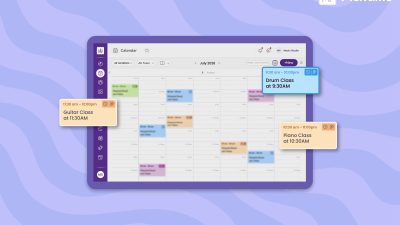
- Manage resource bookings alongside appointments in the Picktime calendar.
- Generate reports that include bookings by resource and other resource-related booking information.
Imagine a clinic with three providers and several treatment rooms. Instead of checking the provider calendar first and the room calendar afterward, you can manage both in the same scheduling process. The same approach works for businesses that schedule meeting rooms, rental equipment, sports facilities, classrooms, or other shared spaces.
Picktime’s resource management software serves different aspects of your business, including appointment and resource management. Without switching multiple tools, our system makes it easier to manage services, locations, team members, and resources in one place. Get started with Picktime for free.
FAQs
1. What is resource management software?
Resource management software helps businesses keep track of the people, rooms, equipment, and other resources they need for each booking. With Picktime, businesses can manage staff, rooms, and equipment alongside appointments and classes in one scheduling system.
2. Is scheduling software the same as resource management software?
Not exactly. Scheduling software is mainly used to manage appointments, calendars, staff availability, and booking times. Resource management system focus more on the additional resources needed to deliver a service, such as rooms, equipment, or facilities. Picktime brings both together, so businesses can schedule appointments while also making sure the required resources are available to rent at the same time.
3. Do small businesses need resource management tools?
It can be very useful if your bookings depend on more than one person or resource. For example, a salon appointment may need both a stylist and a station, while a clinic booking may require a provider, treatment room, and specific equipment. Picktime helps businesses manage those requirements together, making it easier to confirm bookings without checking multiple calendars or risking double-booking a resource.
4. How does Picktime help with scheduling and resource management?
Picktime brings appointment scheduling and resource management into one system. Businesses can manage services, team members, rooms, equipment, locations, availability, and customer bookings from the same place. This gives teams a clearer view of what is available and makes it easier to organize appointments without relying on separate scheduling tools.