Key Takeaways:
- Client feedback helps Pilates studios understand what clients expect before they book a class.
- Reviews and star ratings build trust by showing real client experiences on your booking page. A better Pilates class schedule should be planned around client feedback, attendance trends, waitlists, cancellations, and class capacity.
- Picktime helps Pilates studios collect reviews, manage bookings, track attendance, send automated reminders, and organize class schedules from one place.
- Displaying approved reviews on your Picktime booking page can help new clients feel more confident before choosing a class, instructor, or time slot.
Today’s clients do not prefer scheduling Pilates classes, relying only on brand name or amazing pictures. Before booking, clients often look at every detail, including your Pilates class schedules, instructor experience, studio atmosphere, and client reviews. Even if your booking process is clear and well-planned, clients may still hesitate if your online presence isn’t great.
That is why client feedback can make a real difference. For Pilates studios, feedback works like a direct window into the client experience. It shows which class times feel convenient, which sessions feel too crowded, which instructors clients connect with, and which formats they want to see more often. In this world, 97% of consumers still lean on reviews to guide their purchase decisions.
While Pilates studios need an easy yet effective way to showcase reviews, those reviews should also stay visible where new clients are most likely to book their classes. That’s where Picktime’s review feature improves client experience by allowing clients to add reviews on the online booking page. In this blog, we’ll look at how pilates studio management software can help studios collect insights, manage bookings, and improve schedules without adding more manual work.
Why Client Feedback Matters for Pilates Class Scheduling
Client feedback explains to you what your booking data cannot always explain. A class may have low attendance, but that does not always mean clients dislike the format. The timing may be difficult, or the class description may not be clear. The room may feel crowded, and the class level may not be clear. Therefore, clients may hesitate because they are unsure whether the session is suitable for them.
Before asking your clients for reviews, it’s essential to set class capacities that match your room size, resources, etc. With Picktime’s Pilates studio software, you can add clear descriptions about your services, such as “beginner-friendly” or “no prior reformer experience needed”. Also, you can set session numbers and class capacities based on class requirements. Here’s a way you can improve your Pilates class schedules
Understand What Clients’ Expectations
Clients often share their needs through simple comments, repeated questions, and casual feedback after class. One client may ask for an evening class after work. Another may ask whether you offer weekend beginner sessions. Your regular members may mention their problems, for example, “Friday afternoon class is hard to attend.” Rather than using separate tools, you can use Pickime’s overview dashboard to check how your Pilates classes are doing and how much revenue the studio is acquiring.
With Picktime, you can collect client feedback, save client details, and send follow-up emails more easily when you integrate your Picktime account with a CRM tool. The goal is not to ask long questions, but to understand what would make clients book more often and feel more comfortable with your schedule.
Use Booking Data to Understand Client Feedback
Client feedback remains important when you compare it with booking activities. When clients add reviews, you should analyze each aspect thoroughly, including attendance, waitlist, and cancellations. Consider evaluating classes that are always full, the ones that stay half empty, and the sessions that keep joining waitlists.
Pro Tip: With Picktime’s attendance tracking feature, you can mark student attendance, flag no-shows, and keep the class record organized. This allows you to understand attendance patterns, follow up when needed, and improve future class planning.
Improve Class Times Without Confusing Regular Clients
If you constantly change your class schedules, you could frustrate clients, especially regular clients. Repeat clients often plan their week around fixed class schedules, so sudden schedule changes can feel frustrating. A simple way to secure class schedules is to protect your strongest classes, review sudden changes, and use slower hours for experiments. When your clients provide genuine feedback about class timings, it can help you choose class timings for Pilates studios.
Simplify Pilates Class Schedules with the Right Tools
Find a scheduling tool that can easily streamline your online booking process. Pilates booking software like Picktime offers several features to manage class schedules without adding extra admin tasks. It helps you create different classes, set class capacities, add durations, and pricing. To reduce late cancellations or fill the empty slots, you can add students to the waitlist. If someone cancels close to class time, you can still fill empty slots by adding students from the waitlist.
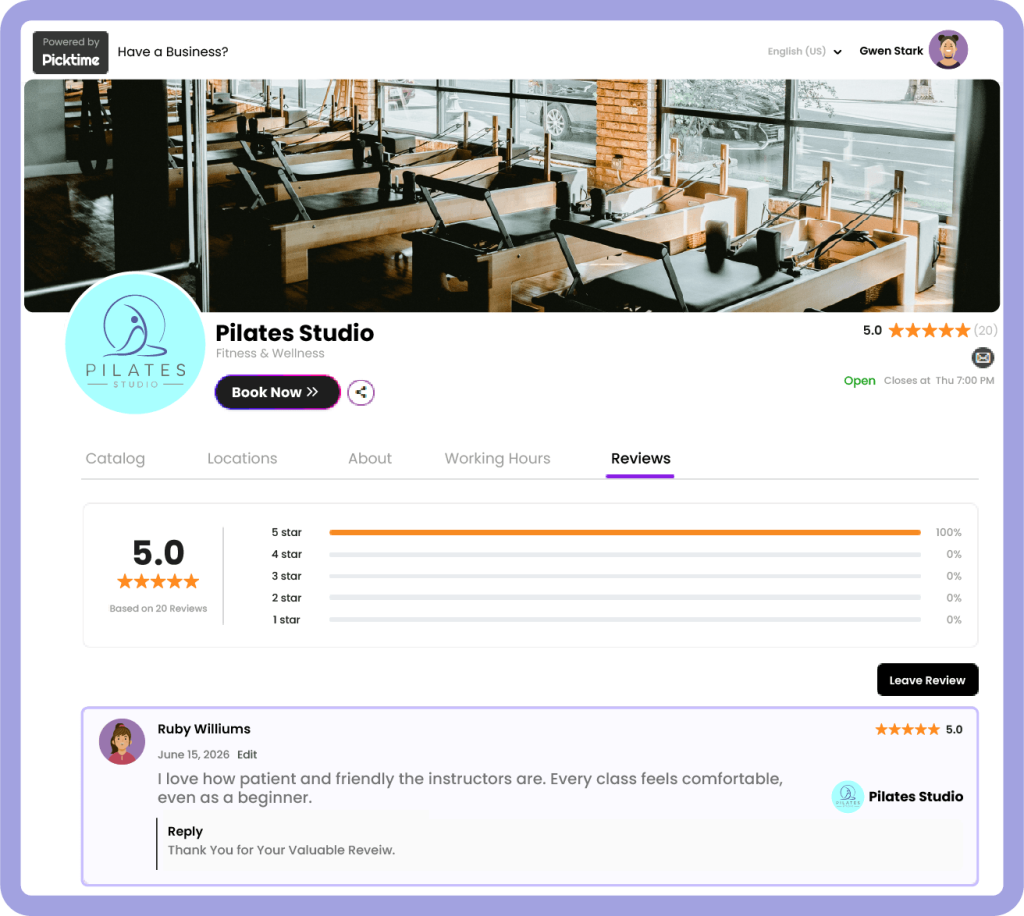
To keep class schedules running smoothly, Picktime keeps clients and instructors updated by sending booking confirmations and reminders. It integrates with your existing third-party apps, such as payments, calendar sync, CRM tools, and more. Once clients complete their Pilates class schedules, you can send follow-up emails along with your online booking page link to leave a review. Once client reviews are approved and published, they can appear directly on your Picktime booking page, right where new clients are choosing a class, instructor, or time slot.
By seeing real reviews from other clients on your booking page, clients are more likely to choose your studio. From your Picktime dashboard, studio admins can easily analyze client feedback, reply to comments, approve reviews, and publish them. This keeps your best client experiences visible and helps new visitors trust your studio before they step in.
Conclusion: Build a Pilates Schedule Clients Want to Book
Reviews are a great way to drive more bookings as they gain online presence and trust among clients. When potential clients see recent feedback and strong star ratings, it becomes easier for them to trust your studio and book a class. When clients finish your Pilates classes, asking for feedback is a great way to showcase that your clients love your classes. To strengthen your studio’s online presence, ask clients to submit their valuable reviews on your Picktime booking page.
By streamlining the entire scheduling process, from booking to adding reviews, Picktime helps you organize your Pilates class schedules, rooms, waitlists, reminders, payments, and reviews in one platform. This makes it easier to use client feedback to build a schedule that works better for your team and is simpler for clients to book.
By simplifying the online review process, Picktime helps Pilates studios build trust and create a smoother client experience. Start using Picktime’s Pilates scheduling software today.
FAQ’s
1. How does Picktime help Pilates studios collect reviews?
Picktime makes it easier for Pilates studios to collect client reviews directly through the booking page. After a class is completed, clients can use the booking page link to share their feedback, helping studios gather reviews without repeatedly following up or asking each client manually.
2. Can Picktime display reviews on the booking page?
Yes. With Picktime, approved reviews can be displayed directly on your online booking page. This allows new clients to see star ratings and real feedback while they are choosing a class, instructor, or time slot.
3. How does Picktime help reduce empty class spots?
Picktime allows Pilates studios to manage waitlists, send automated reminders, and track attendance. If someone cancels, your team can quickly add a waitlisted student and keep the class spot filled.
4. Can Picktime help studios manage class capacity?
Yes. Picktime lets Pilates studios set class capacities based on room size, equipment, and session type. This is especially useful for reformer classes, mat classes, private sessions, and shared studio spaces.