Key Takeaways
- Manual scheduling may work when you are small, but it becomes harder to manage as more clients, pets, services, and team members come in.
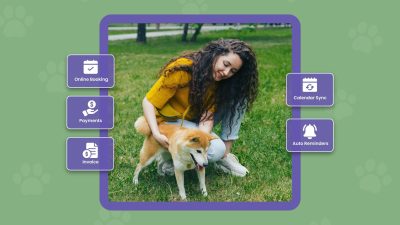
- Dog daycare booking software helps pet parents book on their own, even after business hours. This means fewer missed calls, less back-and-forth, and more confirmed appointments without adding extra front-desk work.
- Online payments and deposits help protect your revenue. When clients pay in advance or leave a deposit, they are more likely to show up, and your team spends less time chasing payments.
- Team scheduling becomes easier when bookings and team availability are connected. You can assign the right service to the right team member, avoid overbooking, and make sure your team has enough coverage for the day.
For doggy daycares, people may think that it’s easy to run a daycare behind the front door. But the harsh reality is that behind the calm front, it’s a lot to handle. You’re dealing with bookings, coordinating team shifts, and checking pet details simultaneously. That’s why you need a good scheduling software that manages your bookings, payments, and team smartly. The best dog daycare booking software goes far beyond simply booking appointments; it automates the entire workflow with advanced features and integrations.
Missing one-minute details can turn into double bookings, empty slots, last-minute cancellations, or a team member who shows up unprepared for the day. It empowers your team to manage your doggy daycare more efficiently without hiring a front desk employee. From managing online bookings, payments & invoices, to setting assignments for team members, it helps you manage everything.
In this blog, you’ll know how dog daycare booking software simplifies your day, fills your schedule, and keeps your team in sync.
Table of Contents
- Why Does Manual Scheduling Stop Working for Dog Daycares
- What Best Dog Daycare Booking Software Actually Does
- Key Features to Look for in Dog Daycare Booking Software
- How Picktime Makes Dog Daycare Management Easier
- Real-World Scenarios From Dog Daycare Owners
- Conclusion: Make Every Booking Count
- FAQs
Why Does Manual Scheduling Stop Working for Dog Daycares
Most dog daycares don’t start with advanced software. They start with a notebook, a whiteboard, a spreadsheet, or a basic calendar. In the early days, that probably feels manageable. A small group of regulars, a few daily bookings, and just enough time to remember most details.
However, as your daycare expands, the very same traditional scheduling methods that seemed easy begin to cause issues. Every day, more pets are coming, more services to keep track of, and more you need to take care of quality services. On the other hand, you might miss phone calls, DMs, and lose track of payments. By now, you’re probably thinking, “We can just stay on top of it.” Until the day you can’t.
When using manual scheduling, it takes so much time, which can be done within a few minutes. It fails in small ways that quietly cost your business time, money, and trust. And the reality is simple:
- A single missed booking can mean a lost regular client.
- Late responses create a bad impression, and pet parents might book somewhere else.
- A messy schedule and scattered bookings make your facility look disorganized.
- No-shows, double bookings, and last-minute cancellations impact revenue.
When you need to schedule a time slot, a basic calendar might not work properly. To run a doggy day care, your team members need to stay on top of every update. From live time-slot availability, service data, pet details, recurring bookings, payments, and much more. Moreover, every pet parent needs different services for their dogs. And certain reservations require a particular team member, or some clients want further instructions. Picktime’s dog daycare booking software not only takes care of your scheduling side but also other aspects of business. It builds credibility, efficient team management, and smooth coordination for your business.
What Best Dog Daycare Booking Software Actually Does
Dog daycare booking software is more than a digital calendar. It manages the full booking journey from the moment a client wants to schedule a visit to the moment payment is collected, and your team is ready for the day.
The right software isn’t just about handling scheduling. It lets clients self-book, reschedule, collect pet details, and pay online for their scheduled services. Whether it’s a confirmed booking, rescheduling, or cancellation, a dog day care software always sends confirmation emails to your team and clients. Furthermore, it organizes team schedules, tracks recurring bookings, and helps your clients to submit reviews on your online booking page.
For dog daycare, this gives much more flexibility. When clients can book with flexibility, they don’t need anyone to help. With an all-in-one dashboard, your team members can see what is happening inside your business. Payments and invoices are managed properly, and scheduling no longer depends on manual scheduling approaches.
1. How Dog Daycare Booking Software Helps Fill Your Schedule
Allow Clients to Book Anytime, Even After Hours
Business hours are the most preferred hours when pet owners consider daycare. Some parents often book at night after their working hours. Some pet parents prefer calling on weekends. And others want to reserve a time slot, before it gets busy. With online bookings, your doggy daycare business remains open even when your front desk is closed. With doggy day care software, pet parents can visit your online booking page, choose a service, pick an available time, and confirm their visit, no waiting required. This makes booking anyway easy, and more clients are likely to book your services.
Convert Casual Interest Into Confirmed Appointments
A powerful booking page translates more leads into bookings. It showcases the service list, prices, real-time availability, business hours, and booking information all in one location. Whenever clients land on your booking page, a welcome message pops up along with detailed information. Therefore, pet owners do not need to ask a thousand questions just to book a daycare service.
Allow Self-Scheduling
With Picktime’s online booking widget on Google Business Profile, social media, and website, pet owners can book appointments anytime, anywhere without asking for your help. A simple “Book Now” button will definitely encourage your clients to book right away.
Keeps Your Calendar Steady With Recurring Bookings
Most of the revenue in dog daycare comes from regular clients. A few people prefer to book the same slot every day, while others require pet sitting throughout work or travel seasons. Adding recurring bookings in advance converts repeat visits into predictable revenue. Rather than asking clients to book the same slot every time, your software allows you to set repeat appointments in advance. With Picktime, you can add recurring appointment slots without setting them individually each and every time. This gives your dog daycare a steadier calendar and helps pet parents maintain consistency.
2. How Online Payments and Deposits Protect Your Revenue
Deposits Encourage Real Commitment
Online bookings are not secured until the payment is made. When clients register themselves without paying any advance amount, they can change their minds. Setting up an advance amount before each appointment can really help you protect your scheduled slots. This can be useful for high-demand services, peak hours, boarding services, and more. You don’t have to chase any clients for payments while maintaining a good bond with them.
Full Payments Make the Day Smoother
Some dog daycares prefer collecting full payment upfront. This makes drop-off faster because clients don’t need to pay at the front desk. Your team doesn’t have to pause care work to process payments. The client arrives, your team checks them in, and the day moves forward. For busy facilities, this takes a real load off the morning rush.
Integrated Payments Save Hours of Admin Time
If you connect Picktime’s online booking system to the advanced payment integrations like PayPal, Stripe, or Square, it makes collecting payments much more flexible. You don’t have to send separate payment links or chase unpaid invoices. You don’t have to record payments manually into your booking system. It means less admin work and fewer missed payments.
3. How Team Scheduling Becomes Easier
Team management is a crucial part of running a business, and dog day cares are no exception. As a business owner, you always need to keep track of everything: your team members’ working hours, service list, days off, breaks, and more. Relying on an Excel sheet or always tracking everything in a separate app is not practical. Here’s how dog daycare booking software helps team members manage:
Match the Right Service to the Right Team Member
Not every dog day care team member handles the same kind of work. One team member may handle boarding sessions for dogs, while another works on paperwork. Also, when you have different daycare locations to manage, it’s hard to do everything on your own. That’s where Picktime comes in to streamline the workflow for your team members. When a client schedules an available time slot, the appointment can be distributed to the right team members without confusing them. This way, your service schedule stays accurate, and bookings stop being assigned to someone unavailable.
Keep Team Schedules and Bookings in Sync
If a team member is off, their availability shouldn’t appear online. If a service needs a certain team member and that person isn’t working, clients shouldn’t be able to book that service for that time. Dog daycare booking software keeps team schedules and client bookings connected, which prevents manual errors and makes coverage planning easier.
Make Faster Adjustments When the Day Shifts
Things change every day in pet care. A team member may call out. A client may cancel. A service may need to be reassigned. A regular may ask for a different day. When everything lives in one system, managers can make changes fast. The calendar updates, the team sees the change, and the client gets the right notification. That’s much easier than updating a whiteboard, sending a group text, and hoping everyone saw it.
Key Features to Look for in Dog Daycare Booking Software
Not every scheduling platform is a fit for a dog daycare. You need software that can handle real operations, not just basic appointment slots. Before choosing a platform, look for the features that support bookings, payments, reminders, team management, and client communication.
1. Online Booking Page
Your booking page should make it simple for clients to choose a service, see availability, and confirm their appointment. It should be easy enough for new clients to use without calling your front desk, and flexible enough to show different services, durations, prices, and instructions.
2. Service and Package Setup
Dog daycares often offer more than one type of service. You may have half-day care, full-day care, boarding, grooming add-ons, trial visits, evaluations, or package-based services. Your dog daycare booking software should let you set these up clearly so clients know exactly what they’re booking.
Example: A daycare could offer a “5-Day Daycare Pack” at a discounted rate to encourage weekly clients.
3. Automated Email and SMS Reminders
Reminders are one of the major reasons clients don’t miss visits, and clients stay prepared. A modern appointment scheduling system for dog day care should send booking confirmations and appointment reminders. You should have the privilege to include your reschedule link in your email notifications, so that they can reschedule anytime.
4. Payment and Deposit Collection
Payment collection should be part of the booking flow. Look for dog daycare booking software that lets you accept deposits, full payments, or partial payments online. This secures bookings, reduces last-minute cancellations, and protects your revenue.
5. Team Scheduling
Your dog daycare booking software should help you manage team working hours, availability, and assignments. This matters even more if your dog daycare has multiple team members, different roles, or services that require specific team coverage.
6. Calendar Sync
The Two-Way Calendar Sync feature helps you avoid missed updates. When the booking system connects with your personal or team calendar, managing your day across devices becomes easier, and your team stays aligned.
7. Client and Pet Details
Your booking system should help you collect the important information your team needs before the clients visit. Client contact details, pet care notes, feeding instructions, medical reminders, behavior notes, emergency contacts, vaccination information, and special requests. The more organized this information is, the smoother your drop-off becomes.
8. Reports and Insights
Reports show you what works. Most booked services, busy days, revenue trends, team member performance and repeat booking patterns. These insights help you make better calls on pricing, packages, hiring and promotions.
9. AI Scheduling Assistant for 24/7 Bookings
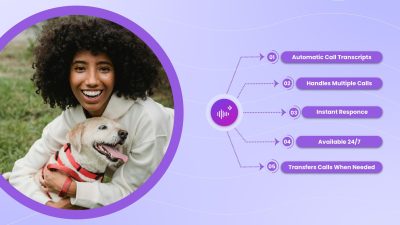
Pet owners often search for daycare options early in the morning, late at night, or whenever they find a spare second. Picktime’s AI scheduling assistant means your business can be open for bookings 24/7 without adding extra work for your team. Picktime AI scheduling assistant can answer unlimited calls instantly, check availability in real-time, book daycare appointments, and help with rescheduling. This way, pet parents don’t have to wait for a callback or go to another daycare. They get immediate help when they need it. That means fewer interruptions in the day and more time to focus on pet care for your team.” For your customers, that means a smoother, friendlier booking experience. And for your business, it means more captured bookings, fewer missed opportunities, and a professional first impression every time someone calls.
How Picktime Makes Dog Daycare Management Easier
That’s where Picktime transforms the way your dog daycare runs day-to-day scheduling. It covers all powerful features, such as online booking, payments, reminders, team management, calendar sync, and reports into one platform. At Picktime, our main goal is that you spend less time on admin and more time running your dog daycare center.
Create a Booking Page Clients Can Use Anytime
With Picktime, you can build a professional looking online booking page for your dog daycare. List your services, prices, durations, and business hours. Pet parents can book from your booking page, website, social media profile links, Google Business Profile, or a shared booking link. It’s like turning your “call to book” into “book in seconds” without needing any human confirmation or back and forth.”
Automate Workflow with Your CRM
If you schedule any booking with a new client using Picktime, it can capture all new lead details automatically. All you have to do is connect your booking system with Zoho, HubSpot, Pipedrive, and Salesforce. Then, if a new client schedules an appointment, Picktime exports the client’s details straight to your connected CRM tools and marks it as a new lead. This means your team can focus on creating email campaigns and sending promotional offers to new leads without manually exporting the clients’ details. You can keep track of each piece of data without toggling between platforms.
Send Automated Email and SMS Reminders
Picktime sends automated reminders by email and SMS to notify clients about their upcoming appointments. It reminds clients before their booking, and updates them if anything changes. This helps in fewer forgotten visits, and your dog daycare feels more organized. Reminders also help clients arrive prepared, especially when they need to bring documents, follow drop-off instructions, or confirm appointment details.
Manage Team Schedules in One Place
If you have multiple team members, Picktime helps you easily manage and organize all their schedules. Each team member gets their own availability, services, and calendar. Assigning bookings, managing work hours, and avoiding scheduling conflicts becomes simple. Your team can see what’s booked, who’s responsible, and what needs attention. Especially helpful if your pet daycare runs multiple services like dog daycare, pet boarding, grooming, or has multiple team members across all locations.
Sync Calendars and Avoid Double Bookings
Picktime supports two-way calendar sync, so your bookings stay connected and in sync across all your logged devices (mobile, tablet, or PC). No more double bookings, and your team gets a more accurate view of the day, and your calendar stays easier to manage. For busy dog daycare owners, that means no more checking three places before confirming a booking.
Collect Important Client and Pet Information
Picktime’s custom booking fields help you collect the details your daycare needs before the client’s visit. Pet information, care instructions, vaccination-related details, emergency contacts, special notes, anything else your team needs to prepare. Drop-off becomes smoother because your team already has the right information even before the client walks through the door.
Track Bookings, Revenue, and Performance
Picktime gives you reports that show how your dog daycare center is performing. Check on bookings, revenue, popular services, team activity, and client trends. These insights help you decide which services need to be promoted, which days need more bookings, and where your team may need more support. Make key business decisions based on real booking data, not guesswork.
💡Remember: Your dog daycare booking software should work in the background so your team can stay focused on the pets in front of them.
Real-World Scenarios From Dog Daycare Owners
Every dog daycare runs a little differently. The size of your facility, the services you offer, and the type of clients you serve all shape how scheduling actually plays out on the floor. Here’s how Picktime fits into different daycare setups.
Boutique Daycare Owners
Jessica runs a small pet daycare center with a tight cap on daily bookings. Quality over quantity is her whole pitch. But when her phone rings during play sessions, she can’t always answer, and missed calls were quietly costing her new clients.
With Picktime, Jessica embedded an online booking link to her website and Instagram bio. New clients can now book visits without waiting for a callback. Her clients can see available time slots, choose preferred team members, and book appointments to stay stress-free.
Multi-Location Daycare Operators
Marcus manages two dog daycare locations across the city. Coordinating the team across both was a daily headache, and clients were sometimes showing up at the wrong location. Each location had its own way of tracking bookings, which made things even messier.
Picktime gave Marcus one shared system for both locations. It gives an all-in-one dashboard to manage and track everything in one place. Clients pick the location they want during booking. And when a team member calls out, the manager reassigns the day in minutes.
Pet Daycare and Boarding Combo Businesses
Sarah added overnight boarding to her daycare last year. Demand picked up fast, but so did the admin work. Daycare and boarding bookings were getting mixed up, and she kept double-booking kennel space.
With Picktime, Sarah set up daycare and boarding as separate services with their own capacity rules. Boarding now requires a deposit at the time of booking, which has cut last-minute cancellations significantly. The kennel calendar finally matches reality.
Daycare and Grooming Hybrid Facilities
Nick runs a daycare that also offers grooming as an add-on. Pet parents loved the convenience, but coordinating between the daycare team and the groomer was tricky for daycare centers. Some grooming slots got booked without checking the groomer’s availability.
Picktime’s team scheduling features can fix that. Now, grooming add-ons can only be booked when the groomer is actually working. Nick’s team sees the full day at a glance, and pet parents get a smoother experience from drop-off to pick-up.
Conclusion: Make Every Booking Count
The best dog daycare booking software adapts to every aspect of your business. Whether you’re managing a team, payments, or unlimited appointment scheduling, Picktime’s dog daycare software offers flexibility and convenience for your business. From AI-powered engagement to secure online payments and CRM integrations, these inevitable features aren’t just nice to have, but they’re what define smart scheduling.
👉 If you’re looking for dog daycare booking software with both basic and advanced features. Try Picktime.
FAQs
1. What is dog daycare management software?
With Picktime, your team gets a simple system to organize the day clearly. Instead of juggling multiple calls, notebooks, spreadsheets, or scattered messages, you can see what is booked, who is coming in, who is assigned, and what needs attention.
2. How does Picktime help missed opportunities for dog daycare?
Picktime helps reduce those missed opportunities by letting clients book online whenever they are ready. They can view available slots, choose the right service, and confirm their booking without waiting for your team to respond.
3. How does Picktime’s recurring booking help dog daycare businesses?
Picktime’s recurring bookings make it easier for pet parents to schedule regular daycare visits without booking the same slot again and again. They can reserve repeat visits for their preferred days, while your team gets a steadier calendar.
4. Can Picktime reduce no-shows for dog daycare centers?
Yes. Picktime helps reduce no-shows by sending automated email and SMS reminders to the pet owners before their scheduled visit time. These reminders keep pet parents informed and give them time to plan their day effectively or reschedule if their plans change.