Key Takeaways
- Running a dog daycare center gets easier when your team knows the dog before the dog walks in. A simple intake form can tell you about behaviour, feeding needs, medication, allergies, and pickup instructions before the rush begins.
- The best intake forms do more than collect answers. They help you avoid awkward surprises like “he gets nervous around bigger dogs” or “It needs medicine at lunch” after the dog has already arrived.
- Pet parents feel more confident when you ask thoughtful questions upfront. It shows that your daycare is not treating their dog like just another booking, but as a pet with a routine, personality, and care needs.
- Picktime helps you add additional intake questions directly into the booking flow, so pet parents can share important details while scheduling an appointment instead of sending them later.
Every day at a dog daycare can feel like a sprint. Suppose you are dealing with three drop-offs at once, phone calls, and you’re still trying to know their behaviours. If your team members start capturing these details after the pet owners reach your day care, they might feel frustrated.
And the worst part? Those missing details can impact the quality of your services if you don’t know the dog. “Oh, by the way… he’s reactive with big dogs.” “She needs medication at lunch.” “I’ll send the vaccine photo later.” That’s how surprises happen and how your team ends up juggling admin instead of caring for dogs.
That’s why one of the easiest ways to make your dog daycare run more smoothly is to use a standard customer additional fields (intake form) during booking. It collects the info upfront, so you’re not chasing it all day through calls or WhatsApp tests. That means you don’t get sudden surprises, and you provide a better experience for both your team and pet owners.
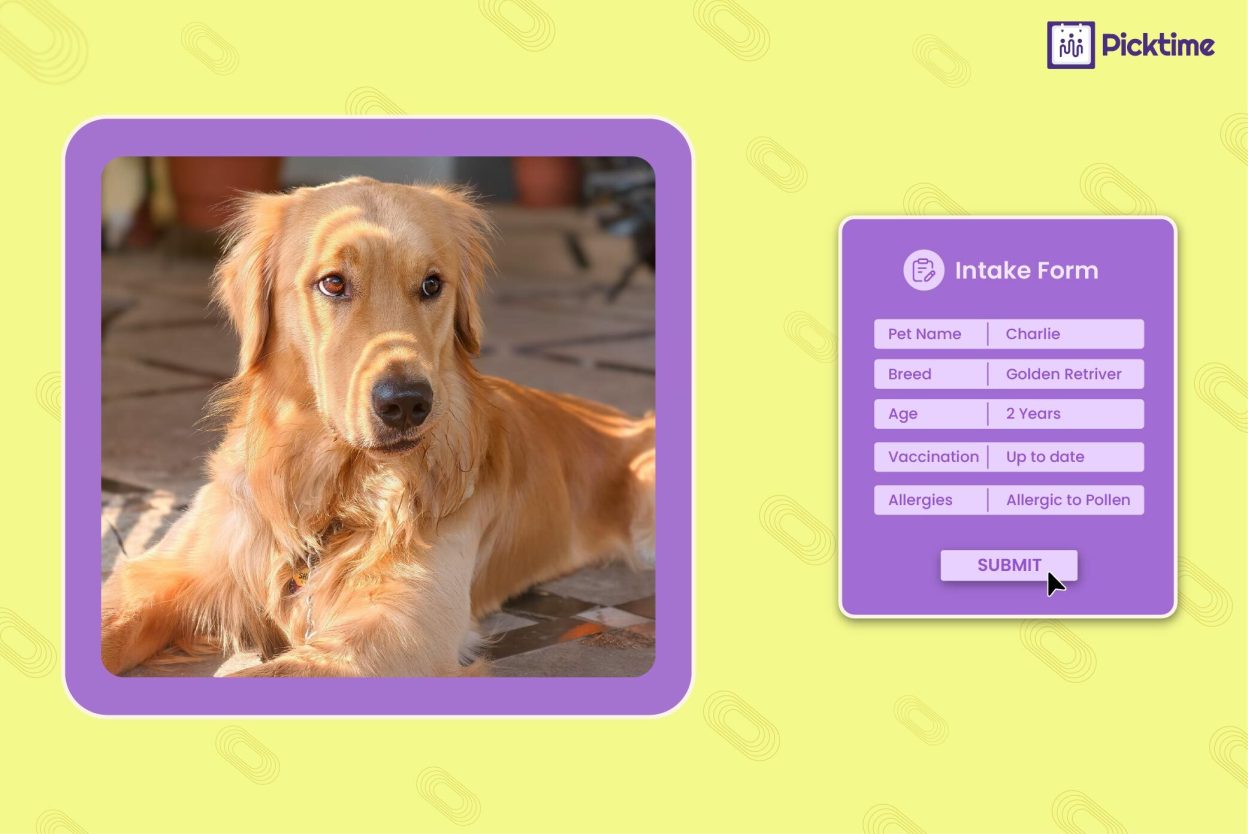
For example, your dog daycare intake form can collect:
- Vaccination records for pets with expiry dates
- Temperament details like dog-friendly, shy, reactive, or separation anxiety
- Feeding and medication instructions with timing, dosage, and allergy notes
- Emergency contact and vet details, including clinic name, phone number, and preferred team member
- Drop-off and pick-up notes, including authorized pickup person and special instructions
What is an Intake Form for Dog Daycares
An intake form for doggy daycare captures all answers on behalf of your team members to learn about the dog. Think of it as a tool that helps you collect all the daycare requirements for pets. Based on these details, they can plan their daycare activities, grooming, food, and other needs for pets. It helps team members to keep the environment safe, prevent conflicts, and give each dog the right care from day one.
Here’s a simple example of how they can capture details:
Pet Parent Name: __________
Phone Number & Email: __________
Dog’s Name: __________
How did you hear about our daycare?: __________
What are your goals for daycare? (check all that apply): __________
Does your dog have any allergies, health conditions, or medications we should know about?: __________
Is your dog up to date on vaccinations and flea/tick prevention?: __________
Any behavior notes we should be aware of?: __________
Additional requests or comments: __________
What’s the Difference Between Smart Intake Forms vs Traditional Methods
Relying on old-school methods to capture client details takes a lot of time and manual effort. Here’s why traditional scheduling methods are failing you:
- The “Lead Leak”: When the booking process is not clear, it directly impacts the customer scheduling process, causing an inefficient booking experience. Today’s pet parents expect convenience and flexibility when it comes to scheduling appointments. If a potential client has to go through irrelevant questions and still does not get the comfort they need for their pets, then it might cause a problem. They’ll move to your competitors who have a better and cleaner booking process.
- The Follow-up Fatigue: With traditional scheduling setups, your team has to note down by hand and figure out whether leads are genuine or not. Sending a survey form to everyone individually and tracking them in an Excel sheet might not work.
- Data Inaccuracy: Generic booking forms often lead to “generic answers. When the questions aren’t specific to the pet’s needs, dog owners may give vague answers just to get through the process. It would leave your team unprepared for the actual meeting.
Benefits of using the Intake Forms for Dog Daycares
The biggest advantage of intake forms is that they do more than collect details. They capture details even before the slot is confirmed. When a dog parent sees you asking the right questions upfront (health history, behavior notes, routines), it reassures them that their dog will be cared for safely, not treated like “just any other daycare center.”
1. You Collect the Right Information Before the First Visit
When the customer booking additional fields are part of your scheduling flow, you can collect key details before the appointment is confirmed. It ensures pet parents can share key details upfront, so you understand their pets’s needs, routines, and preferences before the first visit. It keeps everything clear from the start and helps your team deliver a smoother, more confident daycare experience.
This prevents last-minute surprises at check-in and helps your team understand each dog before group activities begin. This empowers customers to know their dogs are in safe hands. As a result, there will be less room for confusion and frustration.
2. Less Repetition for Pet Parents, Less Admin for Your Team
Online customer additional fields help you save and reuse information for future bookings. When pet parents fill in details on the online booking page, the system automatically saves all the details in a separate customer profile. It means pet parents don’t have to fill out the same details every time. On the other hand, your team members don’t have to re-enter data manually. Rather than repeating basic questions, you can simply ask for updates, such as changes in medication or recent injuries. As a result, it keeps records accurate without slowing anyone down.
3. Get Better Behavioral Insights
Adding customer booking additional fields helps your team understand each dog before they even walk into the daycare center. When you know whether the dog is shy, moody, or anxious, or particularly how they react to these situations, it’s easy to give better dog day care services. You can check each detail through a dashboard without juggling to separate the note app, spreadsheet, or sticky notes.
4. Faster Check-Ins and Smoother Daily Operations
When intake data is already attached to a booking process, your team doesn’t need to search through traditional paper files or emails. Key details are available right from the schedule, making check-ins quicker and more organized. As a result, you save ample time during peak drop-off hours and streamline your day-to-day operations.
5. More Personalized Care for Every Dog
Intake forms help you move beyond “one-size-fits-all” care. When your team members know a dog’s routine, play style, stress triggers, and preferences, they can tailor the day accordingly. That might mean choosing calmer playgroups, adjusting rest periods, or planning activities a dog truly enjoys. Pet parents notice this level of attention, and they remember it.
6. A Professional and Reliable Booking Experience
A well-designed customer booking form signals professionalism for your dog day care business. It shows that your day care values safety, health, takes each booking seriously, and their dog isn’t “just another booking.” When pet owners feel confident from the very first reaction, they are more likely to book your services and recommend other dog parents.
How to Use Intake Forms Before Every Dog Daycare Booking
Choose the Right Scheduling Software
The first step of capturing your pet owners and pets’ data is when you invest in the best dog daycare booking software. Online scheduling tools like Picktime help you add customer booking fields directly to your online booking page. So pet owners can fill them out while you can spend your time on what is more important. The online form will feel like a natural part of your online booking flow.
Create Forms Using Custom & Additional Booking Fields
Once you’ve configured the doggy day management software, you can ready capture details. You can include all the important questions without any help from coding. Once they fill in all the details, like pet routines, behaviour notes, care preferences, and emergencies, Picktime saves and stores all the details for team members’ reference. Inside the customers tab, our software creates a separate new customer profile, along with booking history, notes, and contact details.
Make Intake Forms a Required Step in the Booking Flow
To avoid missing information, intake forms should be required in the booking flow. Once you set questions, make them mandatory to fill out during the booking process, not after, so that your team receives all necessary details before the dog arrives. This builds smooth check-ins, reduces follow-up calls, and ensures team members are prepared in advance. It also signals professionalism to pet parents, showing that your daycare values preparation and safety.
Review, Reuse, and Update Information Over Time
Implementation doesn’t stop after the first form submission. A smart intake process allows you to reuse existing information for future bookings and only request updates when needed. Encourage pet parents to review and confirm details periodically, rather than filling everything out again. This keeps records accurate while saving time for both your team and your customers.
Conclusion
When you add smart booking fields to your online form, you start every visit with the right details already in place. As a result, it’s easier to plan care based on each dog’s needs, size, and routine. With Picktime dog daycare software, you can quickly add intake forms inside your booking flow to collect the essentials from pet parents and keep everything organized in one place. That means less chasing information, fewer last-minute questions, and more time to focus your energy where it matters most, caring for the dogs.
👉 Set up your first intake form in Picktime today and make every check-in smoother from the very next booking.
FAQs
1. Why are intake forms essential for doggy daycares?
Doggy daycares need intake forms because every dog is different. With Picktime, you can add additional questions about pets, like their age, name, behaviours, and more, directly to your online booking flow, so pet parents share the details while scheduling.
2. Can Picktime save intake form details for future bookings?
Yes. Picktime can store client and booking details, so your team can refer back to important information when needed. This is useful for repeat clients because they do not have to share the same details again and again.
3. Can Picktime make intake forms mandatory during booking?
Yes. You can choose and make important customer additional fields (intake forms) mandatory in the booking flow, so pet parents must add these additional fields before submitting their appointment request.
4. What is the best dog daycare management software?
Picktime is one of the best dog daycare management software for daycare centers. It helps them solve all scheduling errors, reduce no-shows and double bookings while building long-lasting relationships with pet parents.