Key Takeaways:
- Round-robin scheduling automatically distributes appointments across your team, reducing the need to assign every booking manually.
- Picktime gives businesses different ways to distribute appointments, including priority-based, even distribution by total bookings, and service-specific distribution.
- Priority-based distribution works well when certain team members should receive bookings first, while even distribution helps spread appointments more fairly across the team.
- Automated appointment assignment reduces manual coordination, giving teams more time to focus on customers and daily operations.
Imagine you’re leading a team, and each morning you look at the schedule only to see the same pattern repeating itself. One person’s calendar is packed from morning to evening, while others are left with scattered appointments. It not only slows you down but also chips away at team morale.
In a well-balanced team, all individuals should have an equal chance to shine. If team members have to complete multiple jobs while others have fewer bookings, the thought of favouritism begins to circulate. That’s where round robin scheduling can help. Whether you’re coordinating a client call, training sessions, or consultation appointments, it distributes tasks fairly, keeps workloads balanced, and helps your team function smoothly.
In this article, we’ll explore what the round robin method is and how this smart feature can completely transform the way businesses manage their teams, save time, and improve customer experience.
Table of Contents
- What is Round-Robin Scheduling?
- Difference Between Traditional and Round Robin Scheduling
- Ways to Distribute Appointments With Round Robin for Team Members
- Which Round Robin Method Should You Choose?
- Key Benefits of Using the Round Robin Method
- Try Picktime’s Round Robin Method
- Your Step-by-Step Guide to Round Robin Scheduling in Picktime
- FAQs
What is Round-Robin Scheduling?
With the round-robin method, you can automate the way of assigning appointments to team members in a rotating, organized cycle. Each new booking goes to the next available team member in the rotation. This helps spread appointments evenly across the team, so one person doesn’t end up with a packed schedule while others have gaps.
If you are a business owner managing several team members who handle the same type of appointments. One team member ends up with back-to-back appointments while another barely gets a single appointment. Not only does this create unnecessary pressure for one person, but it also slows down daily operations.
✨Bonus: With Picktime’s online scheduling software, the appointment distribution process is done automatically for team members. It helps you spread bookings evenly across the team.
Difference Between Traditional and Round Robin Scheduling
| Component | Traditional Scheduling | Round Robin Method |
| Booking assignment | Managers decide who gets each booking | The system assigns bookings automatically |
| Workload balance | Some team members may receive more work | Work is distributed more evenly |
| Booking volume | Scheduling can become harder as bookings grow | Easier to manage higher booking volumes |
| Coordination | Requires more back-and-forth | Reduces manual coordination |
| Team capacity | Team capacity can be harder to track | Makes workload distribution easier to manage |
| Best suited for | Works for simple scheduling needs | Works well for teams handling regular appointments |
Ways to Distribute Appointments With Round Robin for Team Members
Picktime’s round robin scheduling for team members allows you to automate the distribution of the team’s workload. Also, it truly matches how your business operates. Businesses can use this feature to speed up tasks, increase productivity, and improve overall business performance.
To choose the right tools, look for options that align with your business needs. Whether you manage a salon, a coaching team, a fitness studio, or a busy consulting service, you can pick the style that feels right for your team.
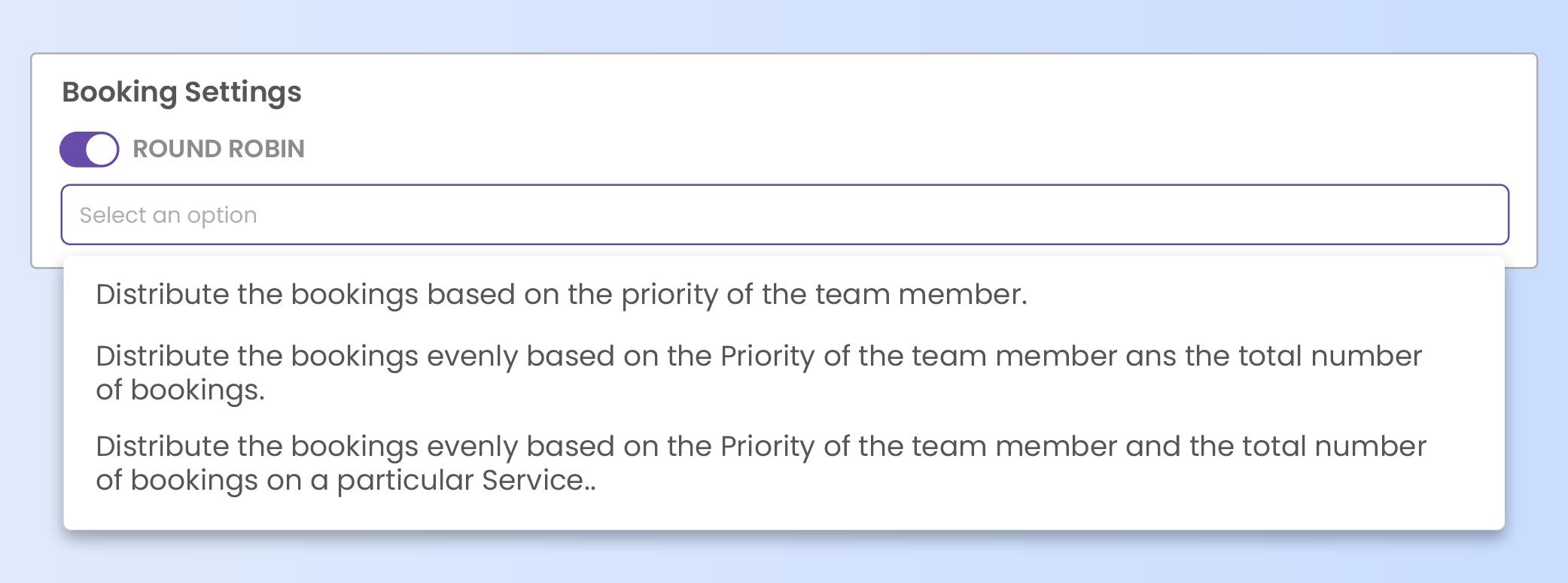
1. Priority-Based Distribution
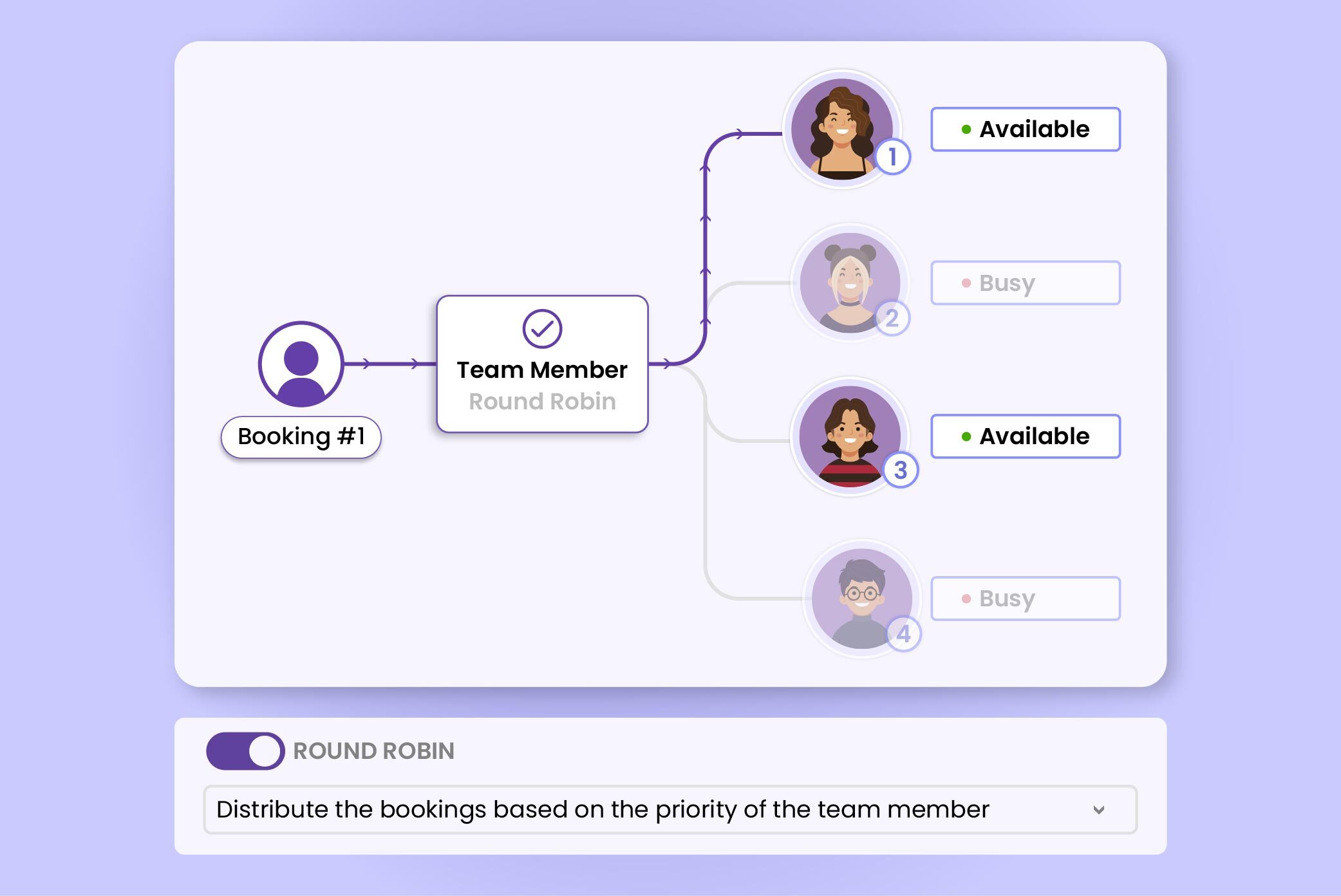
This method covers your team list from top to bottom in a sequence. Picktime assigns the appointments to the first available person. When one team member is already booked, the appointment will move to the next one without going back and forth. It’s a great option if your team already follows a fixed order or hierarchy for appointments.
2. Even Distribution by Team Members and Total Bookings
Imagine those days when one person is overworked while another has barely a couple of appointments. If you use this approach, you can eliminate the guesswork from balancing team member workloads. Picktime keeps track of the number of appointments each member of the team has in a day, and assigns the next appointment to the member with the fewest. It ensures that nobody is overworking and that no one feels overwhelmed. In this setup, your team naturally falls into a rhythm where the workload feels fair and balanced for everyone.
3. Service-Specific Even Distribution
If your business offers multiple services, this method helps you ensure that things remain even within each category. First, Picktime instantly checks who can provide the selected service. Then, if a customer tries to book a service and time, Picktime checks how many bookings each available team member already has for that particular service on that day. Based on bookings, the team member with the fewest bookings for that service gets priority for the new appointment.
👉 Note: If two or more team members have the same booking count, their priority/order in the team list helps decide who gets the booking. It’s also suitable for all kinds of service-based businesses, including salons, fitness studios, wellness centers, repair shops, or any business where team members specialize in different services.
Which Round Robin Method Should You Choose?
The right setup depends on how you want appointments to be shared across your team and what matters most to your business.
| If You Want To… | Round Robin Approach to Consider |
| Give certain team members the first chance to receive bookings | Priority-based distribution |
| Keep the overall daily workload more balanced | Even distribution by total bookings |
| Balance appointments separately for each service | Service-specific distribution |
| Reduce manual booking assignments | Any automated round robin method |
| Manage a growing team more easily | Even or service-specific distribution |
Key Benefits of Using the Round Robin Method
So, what makes round robin scheduling such a game-changer for keeping your small or mid-sized business organized? Once you start using it, these are the advantages that stand out right away:
1. Fair Workload Distribution
When you rely on manual scheduling, it’s almost guaranteed that the most responsive or available person on your team ends up with the bulk of the workload. Not because they’re the only capable ones, but simply because they answer first or happen to be free at the moment.
Instead of unintentionally overloading one team member, it ensures every team member gets an equal share of opportunities. When everyone works with a similar volume of tasks, you can genuinely compare productivity, strengths, and conversion rates without the bias of uneven workloads.
2. Always Provide Better Client Experience
From a customer’s point of view, round-robin scheduling creates a smoother and faster experience. Rather than waiting for one specific team member to free up, prospects are matched with any team member who is available, which means more scheduling options and quicker responses. And when people find a time slot that works for them instantly, they’re far more likely to book, which naturally boosts your conversion rates.
The real magic lies in how consistently this feature works without any conflict. No prospect gets stuck waiting because someone’s calendar is full or because their inquiry wasn’t assigned on time. Each prospect receives the same reliable, timely experience, regardless of when they reach out.
3. Optimized Team Performance
During most of the meetings, you’ll notice that the same few people are vocal, while others remain in the background. This is because sometimes they are quieter in nature, or they simply never have the opportunity to join in. A round-robin approach helps change that. It creates space for everyone to participate in booking, which makes the scheduling organized, so newer team members receive a fair chance to share their thoughts.
When appointments are assigned automatically, your team doesn’t have to debate or coordinate who should take the next client. Instead of juggling calendars, they can focus their time and energy on what matters most.
4. Scales Easily as Your Team Grows
As your business expands, managing schedules can quickly become overwhelming. However, the round-robin method makes the process effortless. Whether you’re working with a small two-person team or a busy group of twenty, the system adapts instantly.
All you have to do is add new team members and set their availability. Then, Picktime’s appointment scheduling software automatically rotates appointments, keeps workloads balanced, and ensures no one gets left out or overloaded. This means you won’t have to reset your whole scheduling app every time a new member joins.
Try Picktime’s Round Robin Method
Round-robin scheduling can really change your team dynamics. If you’re using Picktime’s Free or Starter plan right now, a quick upgrade to the Pro plan will give you access to this feature. By automating the entire appointment task distribution, businesses can save valuable time and ensure tasks are assigned fairly based on availability. No one gets overloaded, and everyone gets an equal share of opportunities.
Instead of relying on complicated manual scheduling, Pictime’s online booking software ensures every team member is included, and no opportunities are missed. This keeps the workflow smooth and prevents any one person from getting unfairly assigned too much work.
Your Step-by-Step Guide to Round Robin Scheduling in Picktime
Setting it up takes just a few minutes:
- Open your Picktime account settings.
- Turn on the Round Robin feature from your online booking tab and Settings
- Decide how you want bookings to be distributed:
- Priority-Based
- Evenly by Bookings
- Service-Specific
- Add your team members and let Picktime detect their availability automatically.
Based on your online booking preference, Picktime will instantly assign tasks whenever anyone schedules through the booking page.
👉 Ready to automate appointment distribution across your team? Set up round robin scheduling with Picktime.
FAQs
1. What is round-robin scheduling?
Round-robin scheduling is a way of automatically assigning new appointments across a team instead of manually choosing a team member for every booking. Depending on the setup, bookings can follow a priority order or be distributed based on how many appointments each team member already has.
2. How does round robin scheduling work in Picktime?
Picktime automatically assigns appointments to eligible team members based on the round robin method you choose.
You can distribute bookings based on:
- Team-member priority
- The total number of bookings each team member has
- The number of bookings each team member has for a particular service
This gives businesses more control over how appointments move across their team.
3. What is priority-based round robin scheduling in Picktime?
With priority-based distribution, Picktime follows the order of your team-member list. The system first checks the team member with the highest priority. If that person is not available for the requested time, it moves to the next eligible team member. This works well for businesses where appointments need to follow a preferred staff order.
4. How does Picktime distribute bookings evenly among team members?
Picktime can look at how many bookings each team member already has and assign the next appointment to an available person with fewer bookings. For example, if one team member has five appointments and another has two, the team member with two or fewer bookings can receive the next suitable appointment. This helps prevent one person’s calendar from filling up while another team member still has available capacity.
5. Can Picktime distribute appointments based on a particular service?
Yes. Picktime can distribute bookings based on how many appointments each available team member already has for the service being booked. If two team members have the same booking count, their priority order can help determine who receives the next appointment.